Jeeves
Launch Jeeves and follow along on HTB!
Introduction
 Discovering your foothold through a Jenkins web application, a test on file enumeration and uncovering alternate data streams. This box highlighted my weaknesses, but we got there with research and persistence. This is a great sample to train your reconnaissance and enumeration methods.
Recon Phase
hey, Going in blind.
$TARGET spawned at 10.10.10.63
Scan the target with NMap, fingerprinting each service.
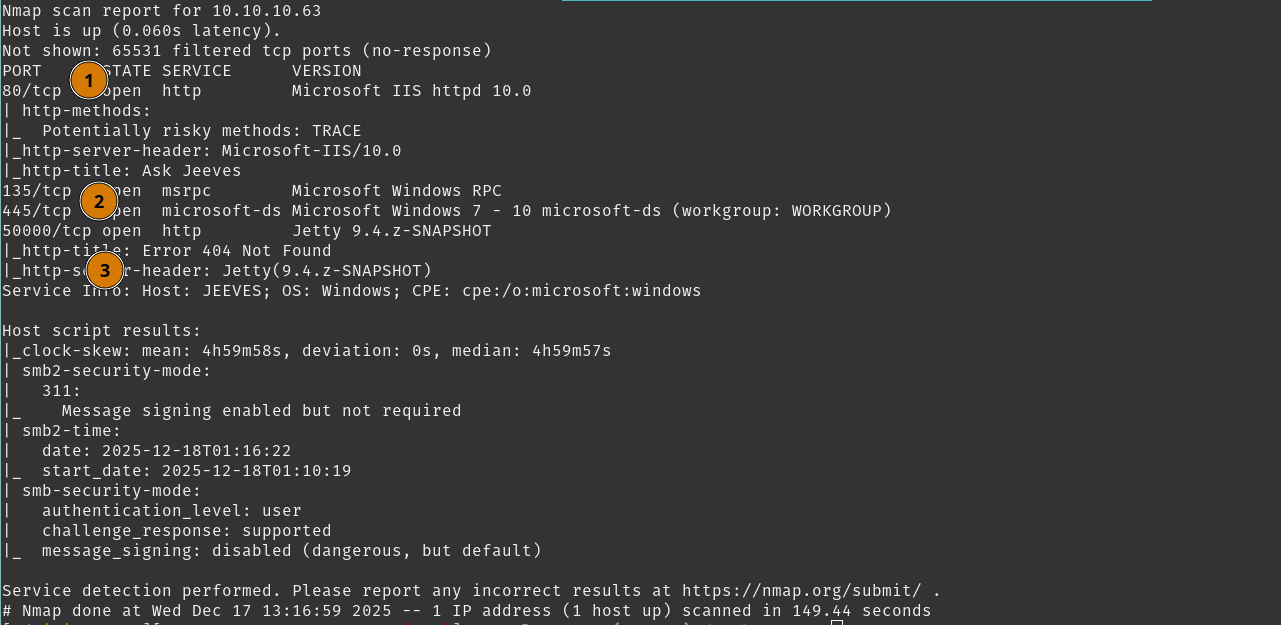 We see a few details here;
- Webpage at port
80/tcpbacked by IIS 10.0. - SMB is open.
- Jetty webserver exists at port
50000/tcp.
Immediately giving us a few investigative tasks.
Tasks
- Check SMB Access
- Review IIS Webpage
- Review Jetty Webpage
Check SMB Access
We do not have any credentials, and this can be a quick task if SMB null sessions are not available.
Using smbclient we check for a null session.
That answers it, we can move on from here.
Tasks
- Check SMB Access
- Review IIS Webpage
- Review Jetty Webpage
Review IIS Webpage
We visit http://10.10.10.63 for any potential findings we can identify.
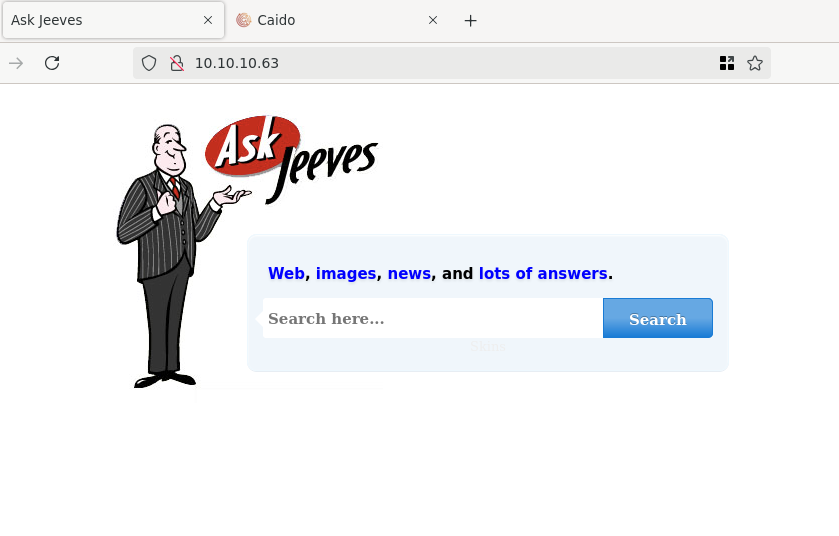 You’ll quickly discover a few caveats in this harmless page.
- Your first search will bring you to an
/error.htmlpage. Aside from the odd timestamp and old MSSQL version, you’ll notice this error is simply an image - and nothing more.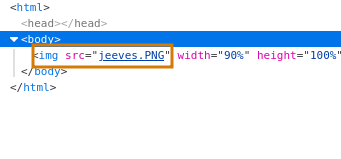
- The search bar on the front page
/does not use your input, and the button will always direct you the/error.html.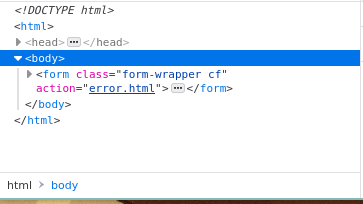
- Running any directory enumeration will only return
index,error, and astyle.cssresult, nothing particularly useful, and no hits with directory traversal for IIS 10.0.
You can move on from here, as there are not a lot of angles to take.
Tasks
- Check SMB Access
- Review IIS Webpage
- Review Jetty Webpage
Review Jetty Webpage
Visiting http://10.10.10.63:50000 you’ll see a 404 error page.
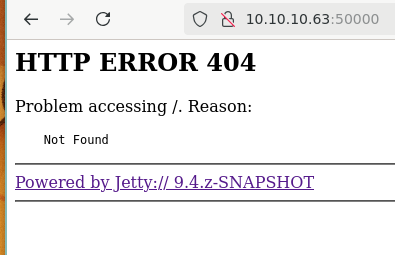 Noticably, we see a dev version of Jetty. Playing around here, you notice you have some user input control with the
 Problem accessinng $INPUT Reason: messaging. We can walk through a few situations here.
- Research Jetty and test out the
WEB-INFdirectory traversal vulnerabilities that come up. You’ll note thatCVE-2021-28164does not work in this instance. - Attempt some XSS techniques against the user-controlled inputs. However, they do get sanitized.
- Directory enumeration, particularly when you run
DirBuster-2007_directory-list-2.3-small.txtfrom SecLists will you receive a hit. After all those red herrings, this moment provides much needed relief.
Using ffuf we try to find any hidden directories.
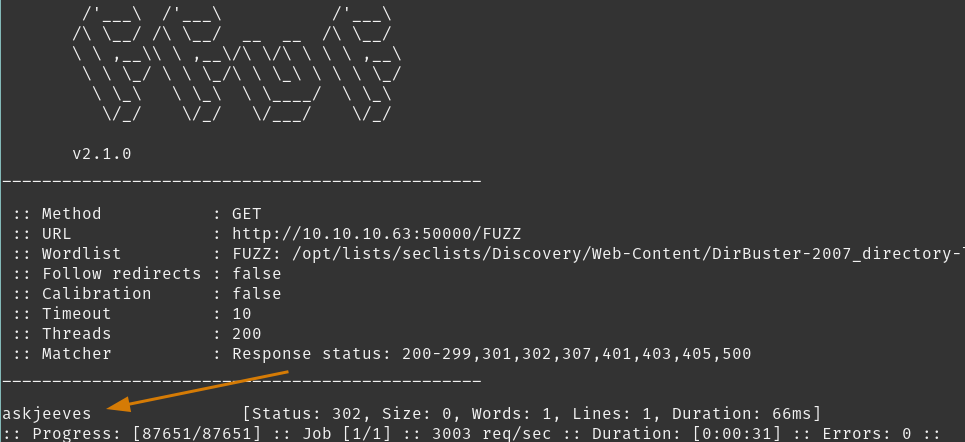 We can go visit
 http://10.10.10.63:50000/askjeeves and see what comes up.
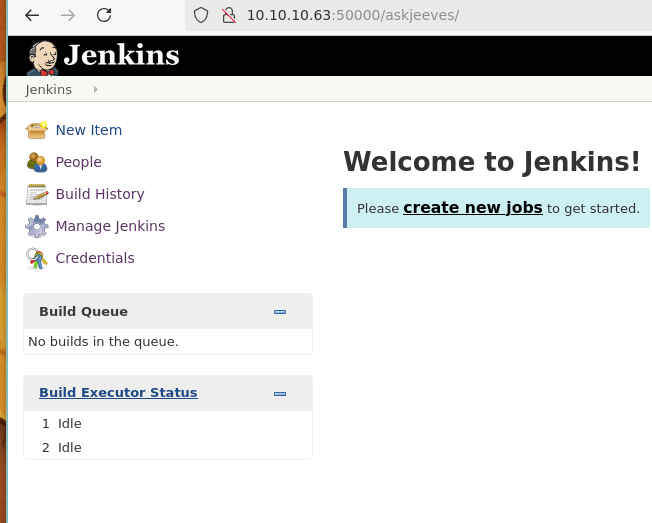 Well we walked into a Jenkins instance.
Tasks
- Check SMB Access
- Review IIS Webpage
- Review Jetty Webpage
- Inspect Jenkins Instance
User Flag
Jenkins is a promising find, especially since we did not need to authenticate.
You’ll notice you have administrator privileges in here, so confidence is high that we’ll get in the box from this point.
Theres two methods you can do this:
- Build a batch job and establish a reverse shell
- Use
groovyscripting console to establish a reverse shell
I’ll continue with Option 2. You can explore the interface and find the script console, but generally its located at /script, so visit http://10.10.10.63:50000/askjeeves/script and we can test for command execution.
In the Script Console, we can send a whoami command to gain some information.

 Confirmed command execution, time to set up for a reverse shell using
 nc on port 6969.
 Now that the stage is set - lets tell Jenkins to execute a reverse shell.
Run that and..
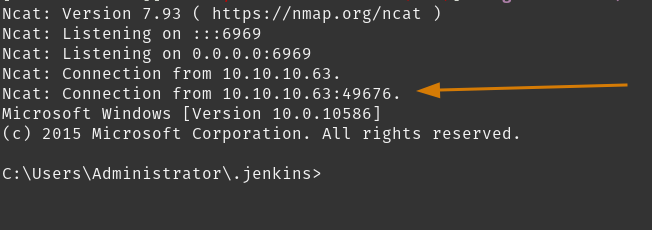 We caught it!
The Jenkins Script Console proved to be our foothold into the webserver. We can start digging for escalation vectors from this position.
Tasks
- Inspect Jenkins Instance
- Enumerate kohsuke user
Enumerate kohsuke User
Weird. We are in the Administrator user directory. But you quickly find that you cannot navigate into any Administrator folders. We are also in the Jetty webroot. There are a lot of files with interesting keywords existing here. Stay on task and get that user flag, view the contents for kohsuke user desktop.
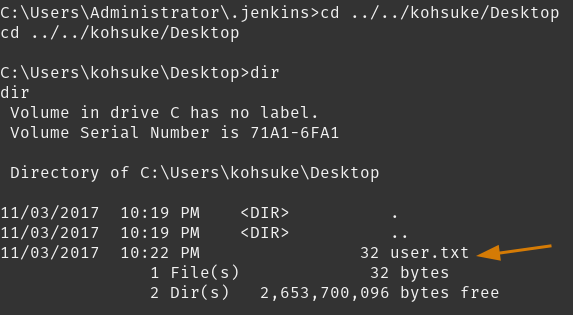
Nice! From here we can start finding our escalation path.
Normally, I start to run recursive keyword searches from strategic filesystem positions.
But doing quick checks in the User directory can bear the secrets we need. Checking the C:\Users\kohsuke\Documents\ directory
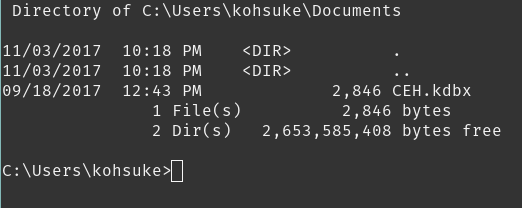
You stumble upon a KeePass database fairly quickly. We will try to crack it, and if that doesn’t succeed we still have a lot of the kohsuke user account to enumerate.
Tasks
- Inspect Jenkins Instance
- Enumerate kohsuke user
- Loot kdbx
- Crack kdbx
- Enumerating kohsuke again
Root Flag
So first we need to transfer the KeePass db back to $CAT_HOST before we can start hash cracking.
Loot kdbx
On $CAT_HOST we can create an SMB share named catShare, and loot it.
Create catShare, then set up the server using impacket-smbserver.
Back on kohsuke we will copy the kdbx to \\$CAT_HOST\catShare
 It was that easy :3
Tasks
- Loot kdbx
- Crack kdbx
- Enumerating kohsuke again
Crack kdbx
So here we look to retrieve the hash from CEH.kdbx using the 2john toolset. The result is a hash to feed into hashcat which we will run against the rockyou.txt wordlist.
Retrieve keepass hash using keepass2john
Feed keepass hash into hashcat
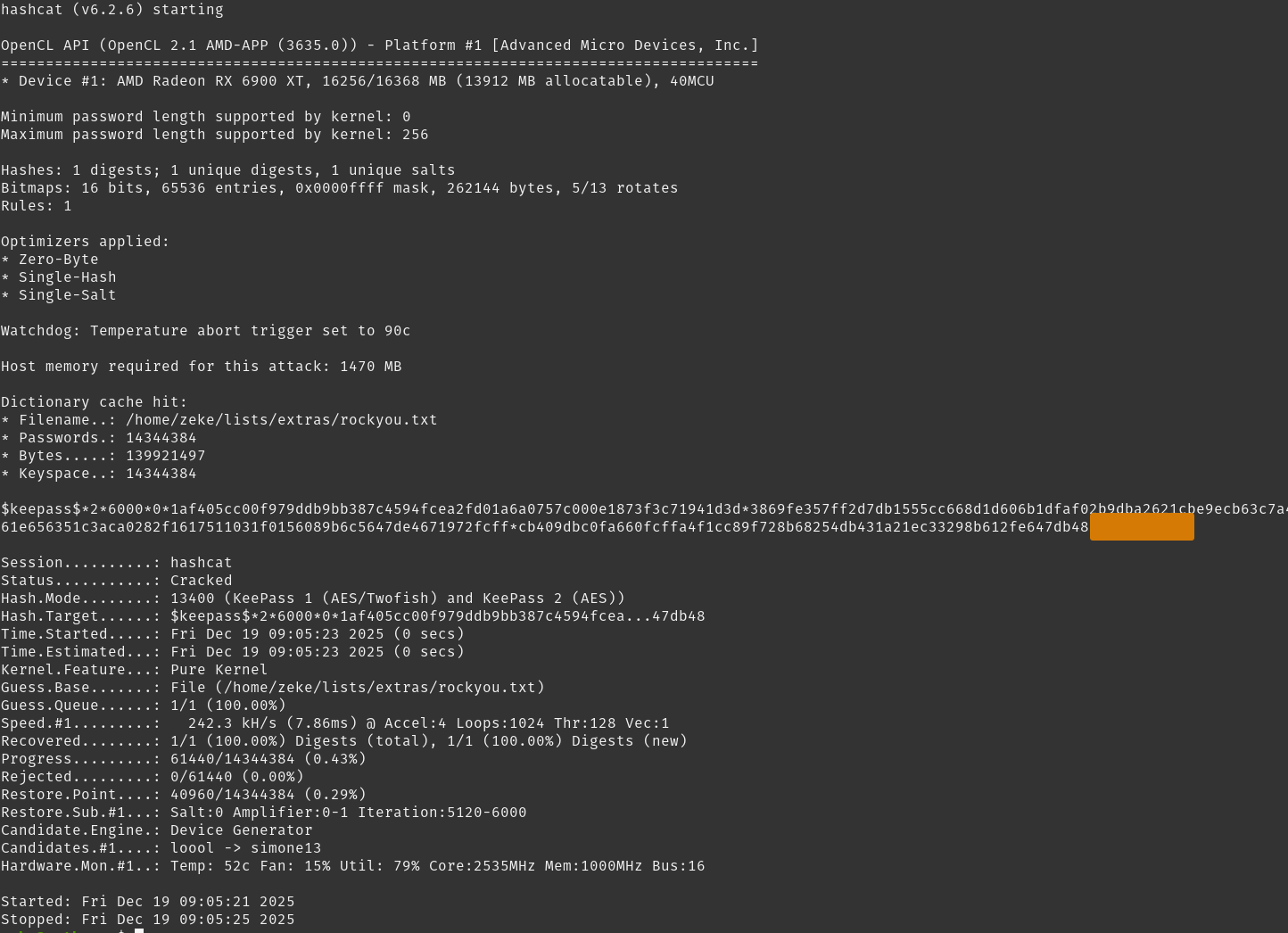 With that! We found our credentials to open the KeePass db.
With unlocking the file, you come across a handful of credentials.
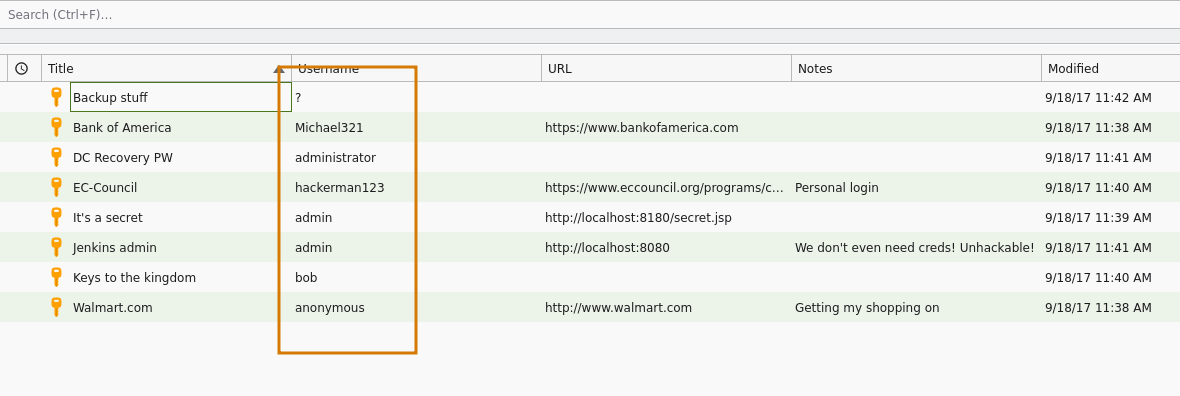 Extracting all the credential pairs here, we get
This feels like a promising find, we have a few sets of credentials to test, some being admin, and weirdly enough the first entry is definitely a NTLM hash, which we can try to use as well.
Tasks
- Loot kdbx
- Crack kdbx
- Test credentials
- Enumerating kohsuke again
Test Credentials
Prepare the password list. We can use NetExec to test credential pairs and see if we get any positive hits.
 And finally, we have the NTLM hash we discovered, try that too.
 Looks like that find was the local administrator hash.
Tasks
- Loot kdbx
- Crack kdbx
- Test credentials
- Retrieve flag
Retrieve Flag
We can start running commands against the webserver as administrator so using smbexec lets authenticate and get the root flag.
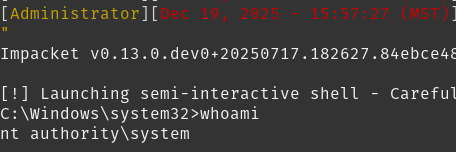
Inspect administrator Desktop folder
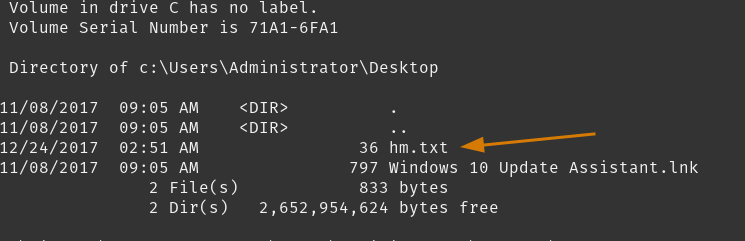 We see a peculiar file instead of the expected
 root.txt?
Open it, see what it says.
Oh..
We can enumerate the box trying to dig for root.txt, but to save time you must see the hm.txt as a literal clue. Alternative Data Stream is a method of hiding content within additional streams of a file. Kind of like treating the file like a folder.
Using the /r switch we can view Alternate Data Streams within the folder.
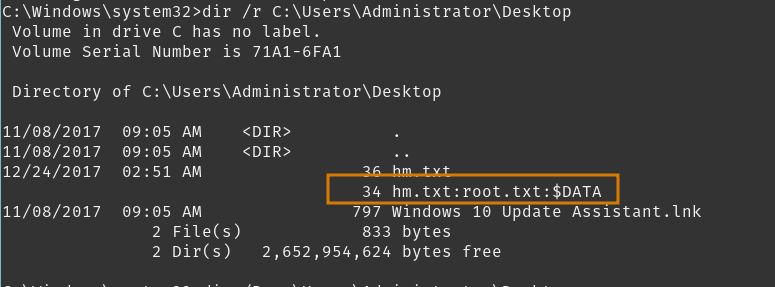
Here, we see root.txt is an alternate data stream under hm.txt, to view this we can use the more command, referencing the file:ADS_file
Conclusion/Mitigations
Okay - going to be honest here. This box highlighted my insufficient reconnaissance and enumeration skills. However, now that I know that, it’s going to help improve those skillsets in the future. Working my way around the initial two webpages led me down some deep rabbitholes that I should have stepped out of much earlier. Reaching hm.txt the first time also had me seeking out many other files of interest and enumerating areas where I didn’t need to be. Learning to identify what’s important, and what is viable, are very important skills. Remembering the concept of alternate data streams brought a glimmer of hope which absolutely paid off. I hope this box taught you something important as well. Learning to identify red herrings and learning to let go on potential vulnerabilities is just as important as identifying them.
Additionally, this box is quite old, making it susceptible to the JuicyPotato and related attacks. You can also complete this box enumerating patch information and finding that, its your adventure.
Insufficient Access Controls - Jenkins
The Jenkins service was improperly configured to not request authentication upon visiting http://10.10.10.63/askjeeves.
This misconfiguration resulted in full access to the groovy Scripting Console, where we were able to execute direct commands on the system.
Implementing either an internal or external authentication method for user management is required. System administrator must update the Authorization settings located in the Configure Global Security menu.
Weak Credentials - KeePass
The discovered CEH.kdbx file was protected with a weak, common password which is publicly available on common wordlists.
This resulted in a sensitive data exposure for account credentials and account hashes.
Implementing a strong password policy would result in a significant improvement for securing sensitive data stored in the KeePass database. Additional measures to relocate the database to a more secure location, or secure the sensitive data held within this database to a more secure location, will result in better protections for this sensitive data.
SeImpersonate Privileged User Account
This is another escalation path upon reaching the kohsuke account; however it was not intended at the time of release for this box. So I will skip this mitigation step in this write-up.
References
| Research | Description |
|---|---|
| Alternative Data Stream | Synopsis on Reading/Writing/E |
| KeePass Password Safe | Password manager tool |
| Jenkins User Documentation | User documentation for Jenkins, great to find secure configuration guides. |
| Tools Used | Description |
|---|---|
| ffuf | Fast and flexible web fuzzer tool |
| hashcat | Advanced password recovery tool |
| JuicyPotato | Local Privilege Escalation Tool using SeImpersonate and SeAssignPrimaryToken |
| NetExec | Network service exploitation tool, quickly automating network security |
| SecLists | Collection of common wordlists to use for security assessments |