Trick
Launch Trick and follow along on HTB!
Introduction
 Trick provides a field to practice Web Recon techniques, Local File Inclusion vulnerabilities to view environment configurations, and an interesting interaction with Fail2Ban. My first experience with Trick did have me follow a few unconventional, convoluted paths that would be easier done with the tools shown in this write-up. The essential path is going to be discovering DNS information, with SQL Injection for bypassing authentication, Local File Inclusion findings to view configuration files and sensitive data, then finally using write permissions to coerce Fail2Ban to run malicious commands.
Recon Phase
Hey,
$TARGET spawned at 10.10.11.166. We’re going in blind.
First we can scan our $TARGET using NMap and gather some information.
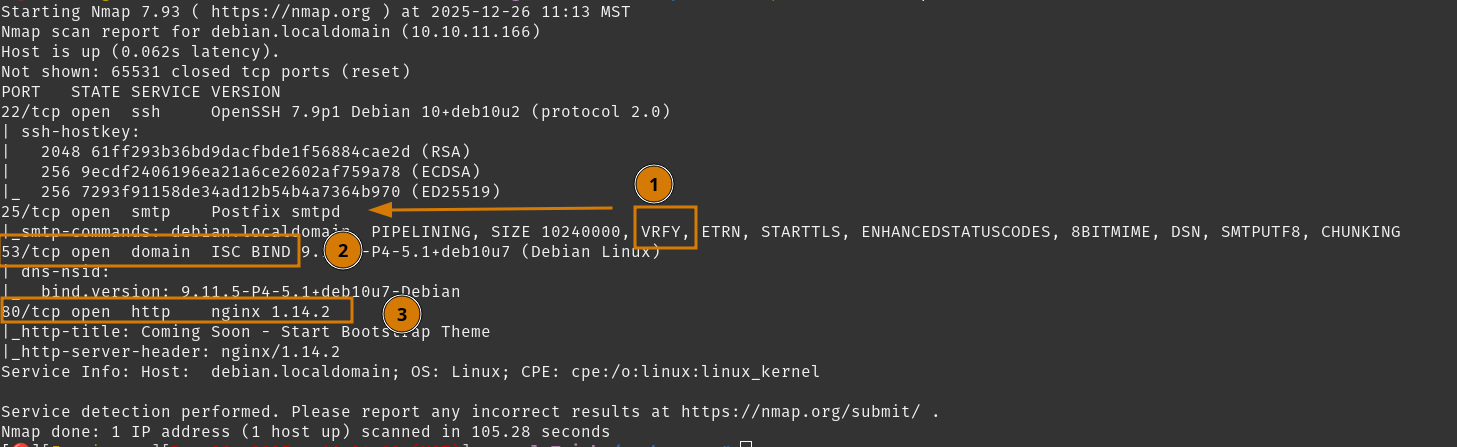 We find useful information that will get us started on finding our foothold.
- Postfix is open, an SMTP service. We also see
VRFYis available so we can attempt some user enumeration via SMTP $TARGETis also running a DNS service, but notice that it shows53/tcp. Usually DNS is53/udpon a Linux host, specifically with the BIND service, but53/tcpimplies we can zone-transfer and get additional DNS information here.- Nginx is running and is serving a webpage on
80/tcp.
Tasks
- DNS Zone Transfer
- Enumerate users via SMTP
- Review website
DNS Zone Transfer
Before performing a zone transfer, we need to know the domain to transfer. We can take educated guesses, but lets query a reverse lookup with dig.
So we have a domain, trick.htb. Initiate a zone transfer with dig.
 Found a Virtual Host for
 trick.htb, called preprod-payroll.trick.htb.
Lets add these to our /etc/hosts so we can resolve these later.
This gives us more websites to review.
Tasks
- DNS Zone Transfer
- Enumerate users via SMTP
- Review
trick.htbwebsite - Review
preprod-payroll.trick.htbwebsite
Enumerate Users via SMTP
We know from earlier that VRFY is a usable command on the open SMTP port. So we can enumerate users using smtp-user-enum tool. We grep the output for response code 252 otherwise our tool will also output response code 550 which are essentially “user not found”.
Here we can assume a MySQL service is running but is not exposed externally.
We can continue enumerating with a larger set of usernames, but it is not required at t his time. If we get stuck we can come back to this.
Tasks
- DNS Zone Transfer
- Enumerate users via SMTP
- Review Website
trick.htb - Review
preprod-payroll.trick.htbwebsite - Enumerate SMTP users further
Review Website trick.htb
Before we begin investigating websites, launch your preferred Web Proxy, mine being Caido.
So upon first visit to http://trick.htb we are greeted with a “Coming Soon” webpage with a webform that notably does nothing.

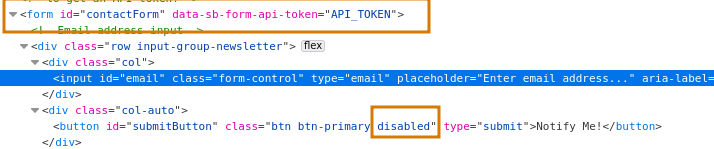 The button is
 disabled and this appears to require an API_TOKEN so we can infer that this webpage is in development.
We can move on, if we get stuck we can come back and dig into this a little more.
Tasks
- DNS Zone Transfer
- Enumerate users via SMTP
- Review Website
trick.htb - Review Website
preprod-payroll.trick.htb - Enumerate SMTP users further
Review Website preprod-payroll.trick.htb
Next website! Let’s look at http://preprod-payroll.trick.htb.
We see a login portal and first we try some easy credentials such as admin:admin.
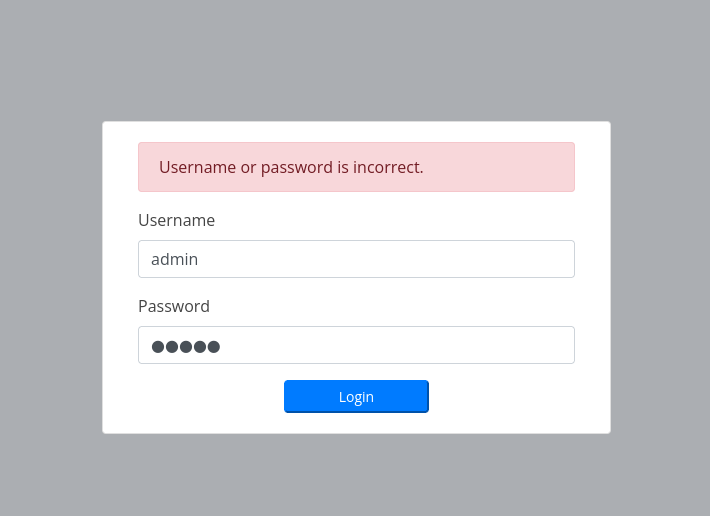 No easy auth from simple credentials here.
So let’s unpack this a little. The webpage is clearly PHP because it’s still being served by Nginx, and the fact it says /login.php in the URL.
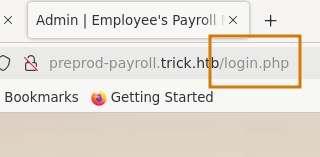 There are a few methods to bypass this. One way is easy as I learned later, and then there is the less obvious way. I think I initially found the less obvious way. Skip ahead if you want to see the intended way.
- Looking at my intercepted requests/response from Caido, I noticed two particular interesting bits.
Request
Response
Two particularly interesting lines to me were my POST request, and the Data in our response.
It tells me we’re using AJAX for some website logic, and the response is peculiar because what does 3 mean here?
We look back into the /login.php page and find AJAX at the bottom of the page.
Walking through the logic, we submit our credentials to a POST request to ajax.php?action=login and the response dictates our redirect. We have three possible response codes.
1go toindex.php?page=home, telling me how the website is designed beyond this login portal due to thepageparameter, and it’s also where I want to be.2go tovoting.php, interesting and we can note that down- anything else will receive
Username or password is incorrect, which is where we are now.
So what if we simply intercept the response and put our desired response code, in our case, 1?
So I try to login again with admin:admin but I intercept the response.
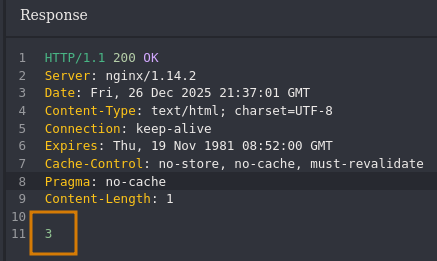 I’ll just modify that to
 1 and then we can Forward that response.
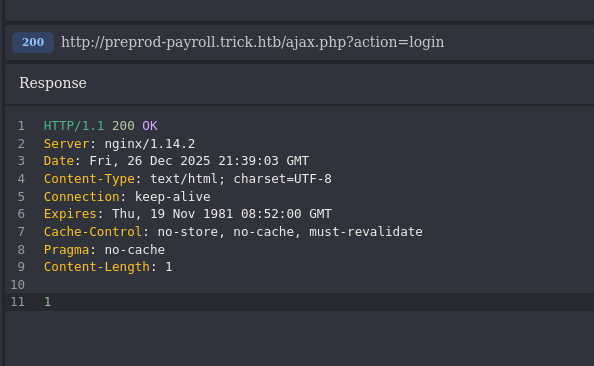 It sends back another peculiar response.
Response
It politely asks me to redirect to login.php. However if you look at the remaining body of the response–
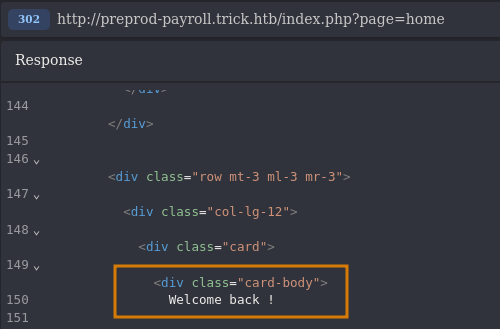 It appears they still provided the
 /index.php?page=home page to us!
I don’t really feel like redirecting from this page so - let’s modify the response headers to 200 OK and remove the location header.
Modified Response
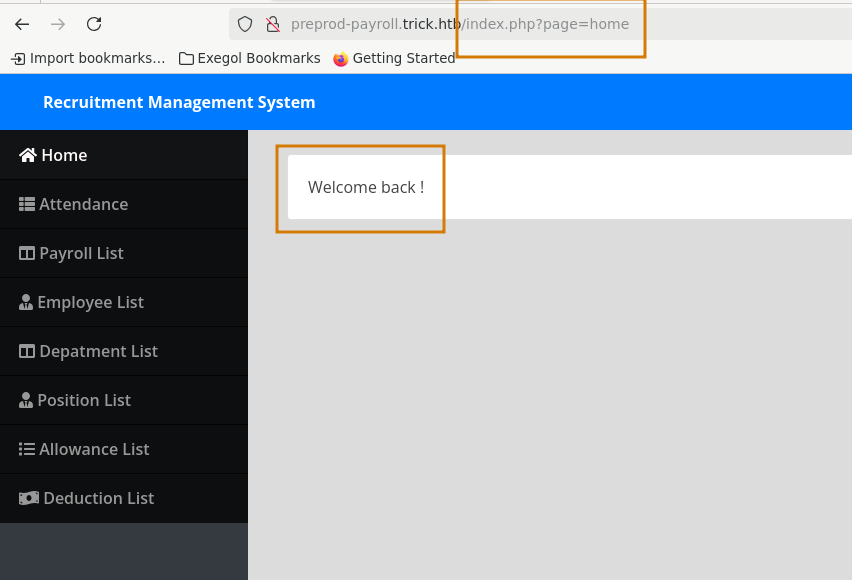 So with the access logic controlled on the user-side, and no other additional authentication / authorization checks. We were able to successfully access the Recruitment Management System, bypassing the login portal.
I later learned there was a much easier method and is a technique I should have tried immediately.
- Back at our initial
/login.phppage. After weak credential tests - consider a simple SQL Injection technique. For username, append' or '1'=1-- -to any username you choose, then type in any password.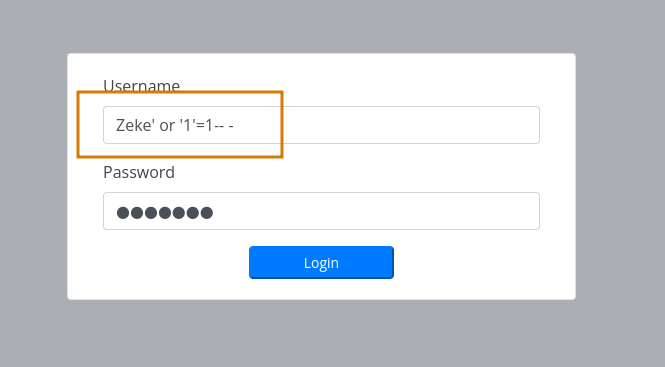 On execution, it will evaluate the sql statement as
 trueand authenticating you as the first user returned from the result.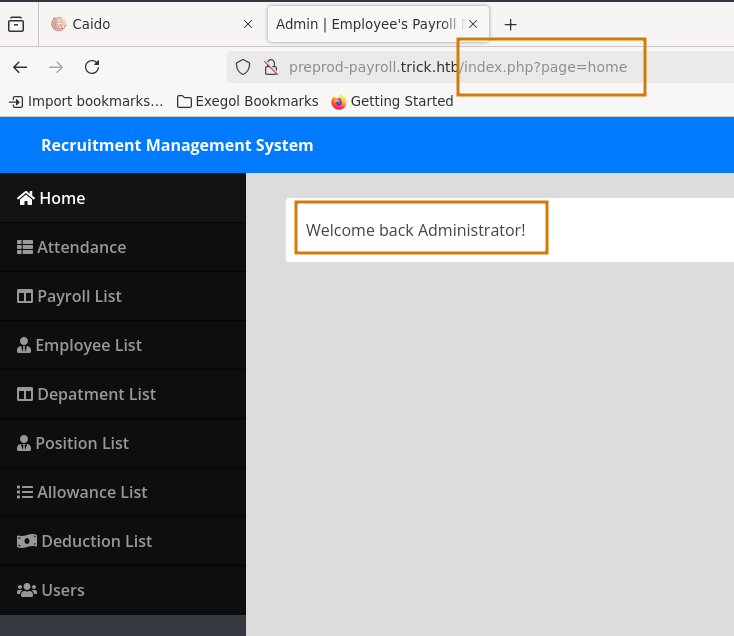 Easy as that - we are now logged in as
 Administratorfor the Recruitment Management System platform.
Now that we have access, we can spend time going through all the forms and pages available to us.
After some exploring the platform, there isn’t much else in terms of escalation from this point. So we can begin attacking the application itself. There are numerous vulnerabilities existing in this application - but we’re on a mission to own the server itself.
We know it is (likely) communicating with a MySQL instance from what we discovered when enumerating users via SMTP. So we can try SQL Injection techniques. There are a number of target pages to choose from, but I dug a little deeper and noticed some interesting php pages.
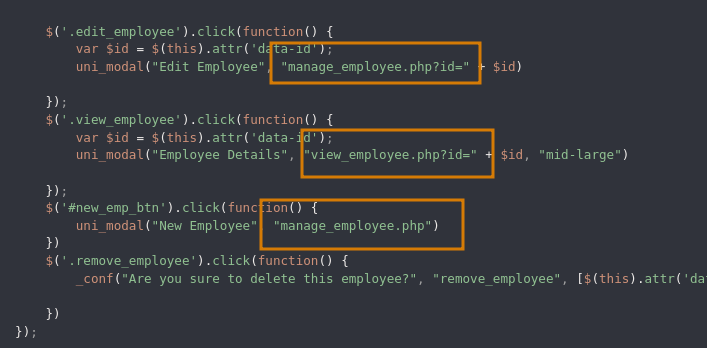
Upon visiting http://preprod-payroll.trick.htb/view_employee.php?id=0 directly, you will see a visually unfriendly interface.
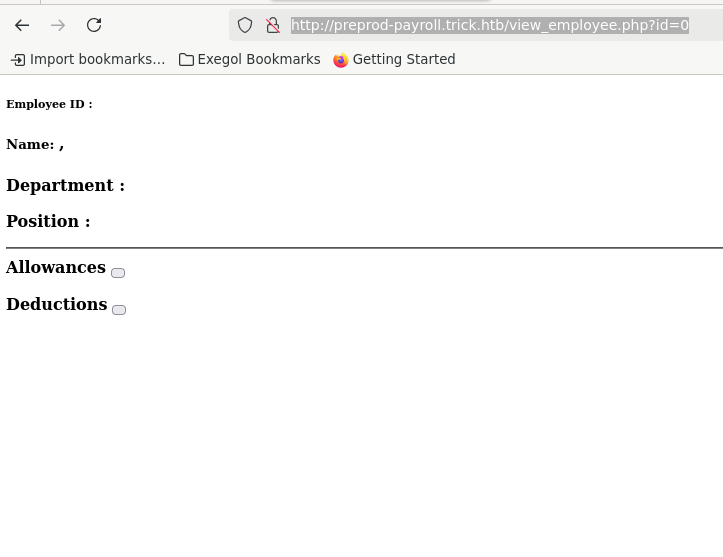 My thoughts from this, instead of working on previous pages with the
 page parameter, here I can work on a less complicated page that holds an id parameter.
Since this is simply a GET parameter, we can run it through sqlmap and see if we can get any SQL Injection vectors.
Fortunately, we do receive a boolean-based blind, time-based blind, and UNION query vulnerabilities from the id parameter.
Looks like we have some enumeration to do, now that we have a promising method for finding our way in.
Tasks
- DNS Zone Transfer
- Enumerate users via SMTP
- Review Website
trick.htb - Review Website
preprod-payroll.trick.htb - SQL Injection enumeration
- Enumerate SMTP users further
User Flag
With our new SQL Injection method found - we can drop the further SMTP enumeration task.
Tasks
- SQL Injection enumeration
SQL Injection Enumeration
We don’t know too much about our current situation, so lets start with enumerating users, passwords, privileges, dbs, tables for non-standard dbs. Using sqlmap once again for our tool of choice.
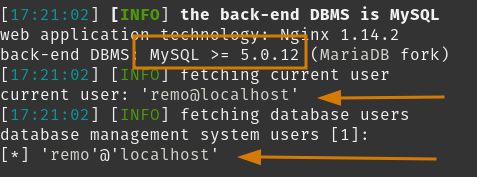

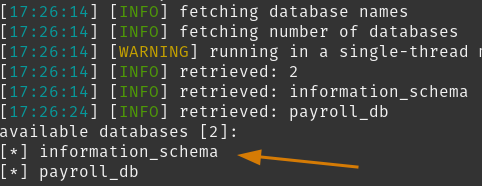 Let’s sort through this.
What we found:
Let’s sort through this.
What we found:
- We are database user
remo, which is a local user to mysql - There are no other database users that
remocan view - The Database Management Systems is Database Management Systems
- We see a
payroll_dbwhich is likely serving the Recruitment Management System application remohasFILEprivilegesremouser is likely blocked from viewing password hashes for database users
With this we can continue enumerating with sqlmap to answer a few more questions.
- Due to our
FILEprivilege, what value issecure_file_privconfigured as? - What tables and data can we pull from
payroll_db?
First lets answer the secure_file_priv question.
So here we see secure_file_priv is configured as <blank>, which is a misconfiguration.
When a user has FILE privileges, and secure_file_priv value is <blank>, the user has full read/write privileges to any directory/file that the mysql user has read/write permissions to on the server.
Next, lets find what we can pull from payroll_db.
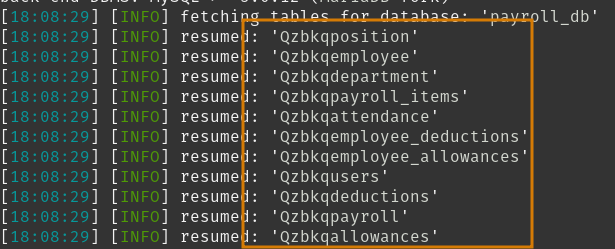 Despite the random string pre-pended to the columns by sqlmap, we can see the only table of interest is
 users, so we dig deeper.
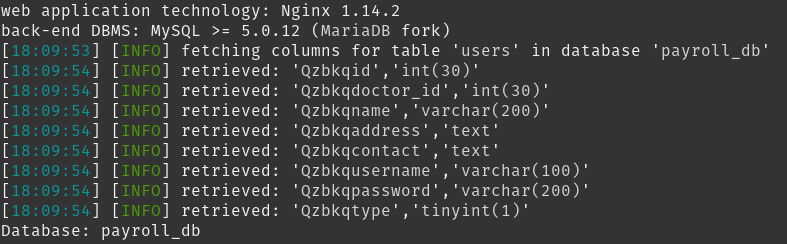 Lets dump this table - we might get a set of credentials.
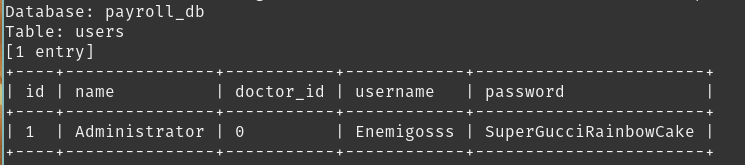 So we found a
 Enemigosss:SuperGucciRainbowCake set of credentials. We can note that down.
sqlmap is a powerful tool, in this instance it found us
- Access as database user
remo - Confirmation to read/write files via SQL Injection
- A set of credentials
Enemigosss:SuperGucciRainbowCake
More importantly, we can begin enumerating the host itself to find our way in as a user. We can also use our new set of credentials to see what access we’ve been provided.
Tasks
- SQL Injection enumeration
- Enumerate Host Configuration Files
- Test Found Credentials
Enumerate Host Configuration Files
Standard method to test out our file read capabilities, we can try to read /etc/passwd for some host information using sqlmap.
We can confirm michael exists as a local user, which was enumerated earlier.
Next steps can be reviewing the website source code to see if we can obtain any method for command execution, but we do not yet know the web root, or if it is even a default web root, so our next targets is reviewing the Nginx config files which by default are /etc/nginx/nginx.conf and /etc/nginx/sites-enabled/default .
Reviewing our looted configuration files; we can come to a few conclusions.
/etc/nginx/nginx.conf( Comments Removed )
Unfortunately, this configuration file is simply wildcarding the sites-enabled directory, so best we can hope for is the nginx/default file being used. Lets review that.
/etc/nginx/sites-enabled/default(Comments Removed, separated into three sections)
First server block, we see the base page from #Review Website trick.htb with nothing particularly interesting. This does use the common /var/www/html webroot.
Next.
Second server block, this is interesting. This is our first instance of seeing preprod-marketing as a Virtual Host. Webroot is /var/www/market so we can review that next. Also, notable difference from the previous server block (and configurations in general), thefastcgi_pass is configured to use a UNIX domain socket that is likely owned by the local user michael.
Final server block; we see our latest website preprod-payroll. Webroot is /var/www/payroll if we need that for later.
Uncovering these configurations is leading us to explore preprod-marketing, and if theres any vulnerabilities on this page that use the configured fastcgi server, we would (likely) have it in context of michael.
Tasks
- SQL Injection enumeration
- Enumerate Host Configuration Files
- Review VHost
preprod-marketing - Test Found Credentials
Review VHost preprod-marketing
First lets append preprod-marketing.trick.htb to /etc/hosts.
Visit the website http://preprod-marketing.trick.htb/.
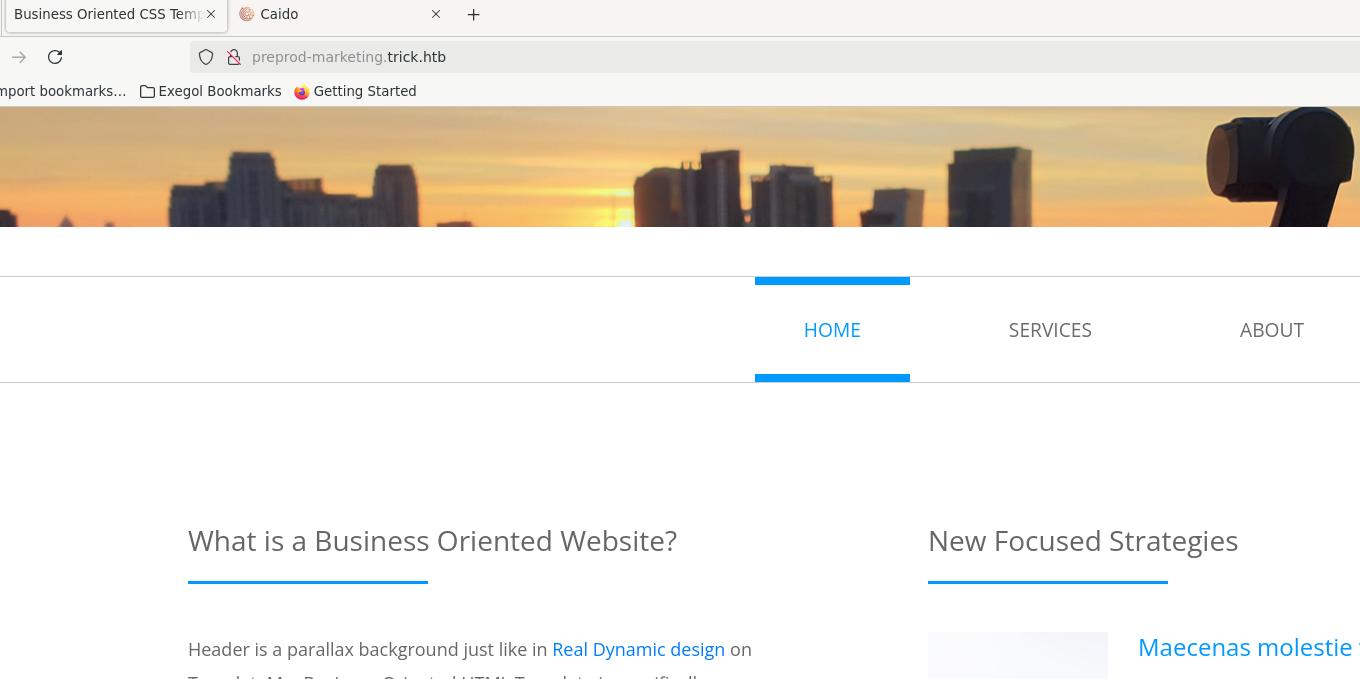
Clicking through, the site has nothing particularly interesting other than the fact it’s using a PHP page controller design pattern to display content, and a ‘Contact Us’ page in page=contact.html.
If we submit a POST request via ‘Contact Information’ on page=contact.html, we don’t find any interesting endpoints or information.
We can test our access to the /var/www/market webroot and review index.php source code using our file-read access from preprod-payroll.trick.htb.
/var/www/market/index.php
Here we see a very basic substring replacement filter. Non-recursive so a $file argument containing ....// will resolve to ../ which should let us traverse the directory and render a file.
Let us test with /etc/passwd.
So we discovered Local File Inclusion on preprod-marketing.trick.htb. There are a few directions we can go from here:
- Use a Log Poisoning technique, modifying our User Agent with a PHP User Agent payload, then using Local File Inclusion to render the
/var/log/nginx/access.logon the page. Use the User Agent to establish a User Agent.
This is a one-shot exploit attempt, due to your first attempt always being rendered first when viewing the access.log file.
Use a Mail Poisoning technique, we send mail to local user account
michaelwith our PHP Web Shell payload. We can use swaks to send mail, or telnet to25/tcpand manually send mail viaRCPT TOcommands. Using our Local File Inclusion technique we render/var/mail/michaelto use our Web Shell for establishing a Web Shell.Check if we can find usable credentials in common spots.
I find method 3 to be easiest to check for, but we do have other options to gain our foothold.
First let’s check if michael has available private SSH keys, default name is often id_rsa.
Sure enough we found a private key. Loot that as michael_trick_id_rsa.
Before trying to log in, check authorized_keys to ensure this key can be used on $TARGET host.
michael@trick is valid for [email protected]. Now log in as michael and get that user flag.
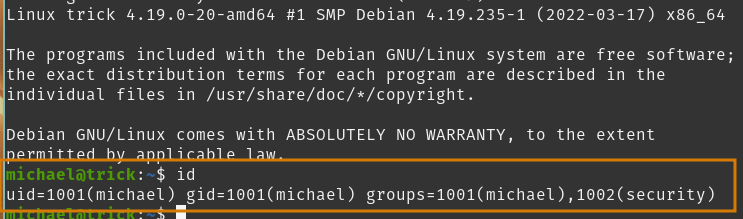 Getting that flag.
Moving forward, we can work on finding the root flag, but we have new ground to cover. Now that we have access to the box as michael, we need to enumerate what permissions and access we have, and leverage what we can to escalate up to root. We can also drop ‘Test Found Credentials’ task cause, well, we have access. If it comes to testing password-reuse elsewhere, we can refer to the credentials we found.
Tasks
- SQL Injection enumeration
- Enumerate Host Configuration Files
- Review VHost
preprod-marketing - Enumerate permissions for
michael - Test Found Credentials
Root Flag
Notice from our previous id command, we are part of the security group. We can explore both michael and security permissions for our local user access.
Tasks
- Enumerate permissions for
michael - Enumerate permissions for
security
Enumerate permissions for michael
First step for me is checking if this user account can run any commands as root.
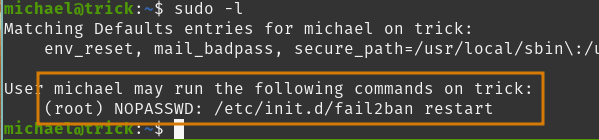 Oh interesting,
 michael can restart Fail2Ban as root. We can add exploring the Fail2Ban setup to our tasks.
Additional enumeration for read/write permissions, environment configurations, etc. does not generate enough interest to mention in this write-up. We can move forward from here.
Tasks
- Enumerate permissions for
michael - Enumerate permissions for
security - Review Fail2Ban Setup
Enumerate permissions for security
security is a non-standard linux group, and our michael user is included in it. So if we search for files or directories owned by security, we may come across interesting finds.
Sure enough, we find another link for local user michael needing Fail2Ban permissions. security has write access on /etc/fail2ban/action.d directory. We might have our escalation vector to achieve root here. Adding an additional task to configure Fail2Ban for a Linux Privilege Escalation vector.
Tasks
- Enumerate permissions for
michael - Enumerate permissions for
security - Review Fail2Ban Setup
- Escalate with Fail2Ban
Review Fail2Ban Setup
Here’s a short lesson on working with Fail2Ban. We will review configuration files in this step.
Default configuration files are located in /etc/fail2ban.
jail.conf is the main configuration file for Fail2Ban, where it will define Fail2Ban jails. A jail is a configured filter per service. Each jail will have configured actions that are defined in the action.d/ directory. An action has a trigger that is defined in jail.conf.
Fail2Ban will typically run as root because it needs to monitor logs and modify firewall rules.
User overrides should use .local naming convention for configuration files.
That should sum up enough for what we need to know. We can review jail.conf and our actions.d/ directory to craft our method for escalation.
Easiest path is to query how Fail2Ban handles failed logins to SSH, and override that action with our own action.
Reviewing /etc/fail2ban/jail.conf, looking for which services are enabled for Fail2Ban will monitor.
It appears only a single service is enabled for monitoring.
Thankfully, SSH is enabled for monitoring, so we can continue with our plan. Next question, how is it configured to monitor SSH?
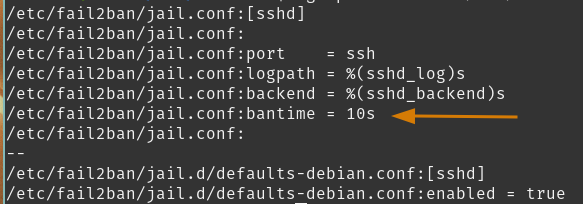 Two important factors to note here.
bantime is 10 seconds, it’s forgivable enough where if we make a mistake we can try again, but it does deter from any brute-forcing (which we are not doing).
Additionally, it is going to use the defaults for maxretry and banaction, so we can check those settings.
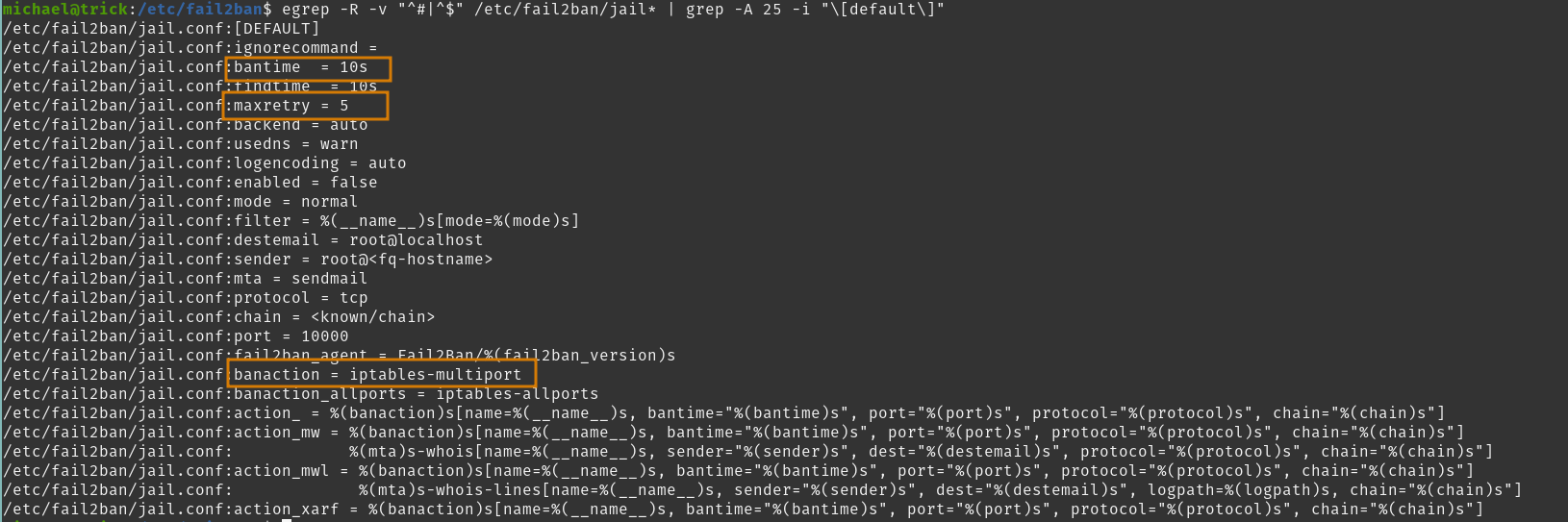 Here we go. This describes the behaviour a little better.
Let’s sum up what we know.
Here we go. This describes the behaviour a little better.
Let’s sum up what we know.
Fail2Ban will monitor and trigger on SSH failed login attempts. After 5 failed attempts, it will invoke the actionban from /etc/fail2ban/actions.d/iptables-multiport.* file and jail the target for 10 seconds.
So if we override iptables-multiport.conf with our own actionbancommand, we can have Fail2Ban perform in the context of root.
Reviewing the iptables-multiport action files.
It looks like root owns the original .conf file, but .local does not exist, which is how we can override a .conf action.
Moving on, we can enact our attack and have Fail2Ban set a SUID bit to /bin/bash for us to use.
Tasks
- Enumerate permissions for
michael - Enumerate permissions for
security - Review Fail2Ban Setup
- Escalate with Fail2Ban
Escalate with Fail2Ban
So we know the configuration. We can copy iptables-multiport.conf to iptables-multiport.local, then edit the actionban to chmod +s /bin/bash.
Copy file; then replace actionban with our own command.
Restart the Fail2Ban service with sudo, this will make our new configurations go into effect.
Then force a actionban from Fail2Ban using thc-hydra with brute-login against [email protected].
Since we overwrote the actionban that would actually block our IP, we will not be disconnected/paused in our SSH session. Keep checking /bin/bash until you see the SUID bit appear.

Once SUID is set, execute /bin/bash -p to enter a shell with the effective UID of root
Welcome to our root shell. Grab the flag to complete the lab.
Tasks
- Enumerate permissions for
michael - Enumerate permissions for
security - Review Fail2Ban Setup
- Escalate with Fail2Ban
Conclusion/Mitigations
Trick provided space to practice fundamental web testing methods, specifically for SQL Injection and Local File Inclusion practice, so you can find your deficiencies and strengths. I got stuck in a rabbit hole at a certain point between preprod-payroll and preprod-marketing, which would have been bypassed if I understood my tools better, and know when to let go of ideas. A stronger knowledge of backend web infrastructure would help with this.
The best portion of Trick was learning Fail2Ban and understanding how you have just enough permissions to make it work in your favour. This led me to learn more about Fail2Ban and how it is configured.
I’ll cover a few mitigations that we can recommend from our attack path. I’ll avoid a full list because I learned the “Recruitment Management System” software is real and packed with CVEs.
DNS Zone File Exposure
The DNS server was configured to allow zone transfers from our $CAT_HOST. This provides an adversary with unneccesary information in regards to the $TARGET internal infrastructure. We used this information to find additional Virtual Host sites hosted by $TARGET.
Configuring the zone file’s allow-transfer attribute to specific hosts that are allowed to receive a zone transfer will mitigate this issue.
SQL Injection - Authentication Bypass
The webpage login portal at preprod-payroll.trick.htb/login.php had insufficient user input validation, thus allowing a SQL Injection attack to bypass the given authentication method.
There are a handful of design patterns and libraries that assist with hardening a login portal from SQL Injection. The login function needs to achieve proper user input sanitization and user input validation, and ensure the MySQL $USER querying the database in this manner is restricted to minimum permissions required to perform their purpose.
Further, design patterms to implement parameterized queries can assist with mitigating SQL Injection.
I may also add the alternative method to bypass authentication, which was removing the client-side control for webpage viewing logic that was done via AJAX, and implement such validation methods into the backend.
SQL Injection - Data Exposure
Data exposure was identified due to the MySQL $USER permission’s allowing file read privileges via the FILE privilege, and secure_file_priv being misconfigured as <blank>. This vulnerability allows the adversary read permissions on sensitive configuration files.
In addition to the input validation and sanitization recommendations as per #SQL Injection - Authentication Bypass, ensuring the MySQL $USER is configured to only use required privileges as neccessary will mitigate exposure of localhost files through SQL queries.
Removing remo FILE permissions, if allowed, will prevent a SQL Injection vulnerable query from reading local files.
Configuring secure_file_priv to a directory that is required for remo to continue functioning for their purpose. If not required, set value to NULL to disable data import/export operations.
PHP Local File Inclusion
Local File Inclusion was identified on preprod-marketing.trick.htb/index.php, allowing the adversary to render local files on the associated webpage. This enabled additional techniques allowing the adversary to achieve a remote shell on the $TARGET.
This vulnerability can be mitigated with additional input sanitization and validation checks. A non-recursive string replacement for relative path traversal was identified. Using PHP framework built-in tools to identify the requested filename, and controlling the web root directory from which the Virtual Host requires, would mitigate this vulnerability.
Insecure Permissions - Nginx Configuration
The file /etc/nginx/sites-enabled/default on $TARGET has fastcgi_pass configured to a Unix Socket that allows access to local user michael files. This enabled sensitive data exposure and user access.
Configuring Nginx with a Unix Socket pertaining to the required purposes of the preprod-marketing.trick.htb Virtual Host would mitigate this issue. This could be a socket as configured with the other virtual hosts in the file, or a new system account specific for the purpose of this socket.
References
| Research | Description |
|---|---|
| Fail2Ban Documentation | Used to understand Fail2Ban usage and configuration |
| Nginx Documentation | Understanding Nginx configuration |
| Tools Used | Description |
|---|---|
| Caido | Lightweight Web Proxy tool |
| NMap | Open-source utility for network discovery and security auditing |
| smtp-user-enum | SMTP user enumeration tool |
| sqlmap | SQL Injection enumeration |
| swaks | Lightweight command line tool for SMTP |
| thc-hydra | Brute-forcing tool |
| dig | Domain Information Groper tool |